
Short answer
A Cursor memory bank is a memory-bank folder of markdown files the agent reads at the start of each session and updates as it works. It is a community pattern from Cline, set up with one .mdc rule. It suits one person well. For a team, move the fast-changing files into a shared vault.
A Cursor memory bank is a memory-bank/ folder of markdown files that the agent reads at the start of a session and updates as it works, so a project's context survives when the chat ends. It is a community pattern borrowed from Cline, not a Cursor feature, and you set it up with one rule file.
It works well for one person in one repo. The trouble starts with a second person, because the file that changes most is the one everybody now edits. This guide covers the setup, then what to do when a team needs the same memory, which is where Baalda comes in.
What is a memory bank in Cursor?
The idea comes from Cline, whose docs call it "a documentation methodology" and not a product feature. A language model starts every session knowing nothing about your project. Cursor's own rules page says it plainly: "Large language models don't retain memory between completions." So you write the project down and tell the agent to read it first.
Cline's version uses six files:
Nothing about this needs Cline. Its docs say the method works with any AI that can read documentation, which is why Cursor users copied it, and why cline memory bank, windsurf memory bank and gemini cli memory bank are all things people search for.
How do you set up a memory bank in Cursor?
There are two routes. The short one takes about five minutes.
1. Add a rule. Create .cursor/rules/memory-bank.mdc. As of 5 November 2026 Cursor's docs say project rules must be .mdc files, and a plain .md file in that folder is ignored. This is a short version of the rule:
---
description: Project memory bank
alwaysApply: true
---

Before any task, read every file in memory-bank/.
After finishing a task, update activeContext.md and progress.md.
When I say "update memory bank", review every file in memory-bank/
and correct anything that is out of date.
If memory-bank/ does not exist, ask me about the project and create
projectbrief.md, productContext.md, activeContext.md,
systemPatterns.md, techContext.md and progress.md.
2. Initialize it. Ask the agent to initialize the memory bank. Give it a few lines about the project, then read what it writes, because anything wrong in these files gets repeated in every later session.
3. Keep it current. Say "update memory bank" at the end of a piece of work. Cline's docs also suggest doing this before you start a fresh conversation, so the next session picks up where the last one stopped.
The longer route is vanzan01/cursor-memory-bank, the repo most people find first, with about 3,100 stars when I checked. Version 0.8 needs Cursor 2.0 or higher and replaces custom modes with six commands: /van, /plan, /creative, /build, /reflect and /archive. It adds a tasks.md file as the source of truth and scales the workflow by task size. Its README also calls it a "personal hobby project" with no issue tracker, so treat it as a good starting point and not as supported software.
Does Cursor have built-in memory?
Not that I can find documented today. Cursor added a Memories feature as a beta in 2025, but on 5 November 2026 the old docs address for it, cursor.com/docs/context/memories, opens the Rules page, and the Rules page has no Memories section. I could not find a removal notice, so check your own Cursor settings before relying on either answer.
What the docs do offer is rules: project rules in .cursor/rules, user rules for your own account, Team Rules set from the dashboard on Team and Enterprise plans, and AGENTS.md as a plain markdown alternative. Rules tell the agent how to behave. A memory bank records where the project stands. Most setups use a rule to point at the memory bank, so you need both. We cover the instruction side in how to write an AGENTS.md file.
What breaks when two people share a memory bank?
The obvious move is to commit memory-bank/ to git. Cursor recommends that for rules, and for files that rarely change it is fine. projectbrief.md and techContext.md can live in a repo for months with no trouble.
activeContext.md and progress.md are different. Cline's docs say activeContext.md is the file that updates most often, and the whole point of the rule above is that every task rewrites it. Put that in front of a team and three things follow.
Conflicts land on the busiest file. Two developers on two branches each finish a task, and both agents rewrite the same paragraphs. Git cannot tell which "current focus" is true, so someone resolves it by hand, usually by keeping one side.
The memory is only as new as your last pull. An agent on your laptop reads the state of your branch. A decision a teammate made this morning on another branch does not exist for it yet.
Only people in the repo can see it. A product manager who should own productContext.md will not open a pull request to change it. The context that matters most tends to come from the people furthest from git.
None of this means git is wrong for code. It means the fast-moving half of a memory bank is a shared document, and git is built for changes you merge later.
How do you share a memory bank across a team?
Keep the method and move the files. In Baalda, the memory bank becomes a folder of ordinary .md notes in a shared vault, for example Projects/Checkout/memory-bank/. Baalda is an open source (Apache-2.0) notes app where those files stay on each person's disk and sync through a live editing layer, so there is one current copy and no branch to pull.
There are two ways to connect Cursor to it.
On your own machine, add the vault folder to the Cursor workspace. The agent edits the files directly, Baalda's file watcher picks up each change and syncs it to the team. Point the rule at the new path and you are done. There is no token.
For Cloud Agents, or to limit what the agent can see, use MCP. Mint a token in Vault Settings, MCP, then add the server as described in the Cursor setup guide. The rule changes to name the tools:
---
description: Team memory bank in Baalda
alwaysApply: true
---

Before any task, use the baalda MCP server. Find the notes in
Projects/Checkout/memory-bank with list_notes and read them with read_note.
Keep the revision that read_note returns.
After a task, update activeContext and progress with edit_note,
passing that revision as expectedRevision.
If the edit is refused, read the note again and redo your change.
That expectedRevision is what makes a busy shared file safe. If a teammate's agent changed the note after yours read it, the write is refused and your agent has to look at the new version. A plain git push conflict tells you the same thing, but only at merge time, and here it arrives while the agent still has the task in front of it.
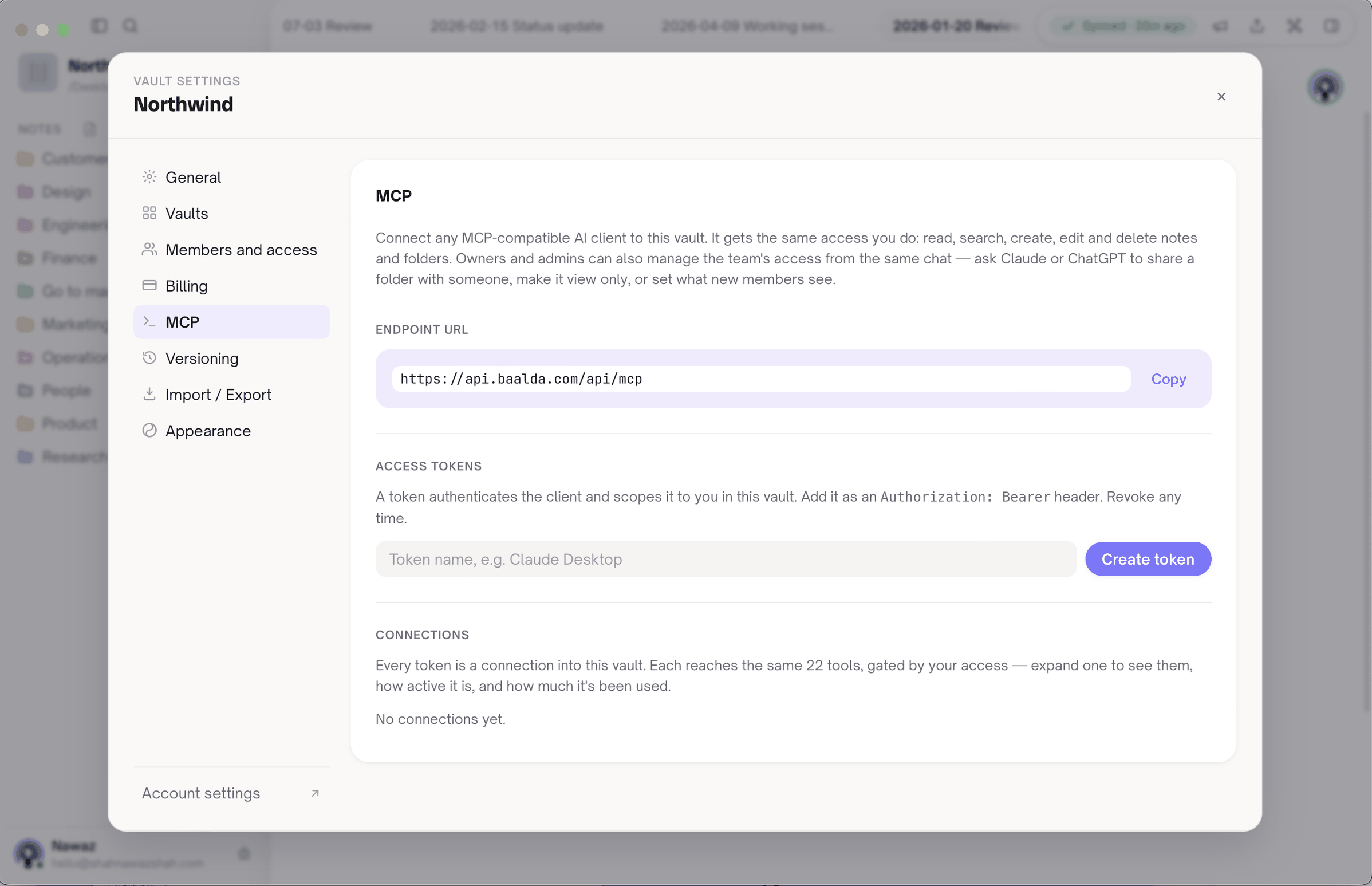
Three other things change. The product manager edits productContext in the app, alongside everyone else, with live cursors. Permissions apply per folder or per note, and a token carries the permissions of the person who made it, so a contractor's agent reaches only what that contractor can see. And Claude Code, Codex and Gemini CLI can read the same notes, so the memory is not tied to whoever uses Cursor. If your team mixes agents, multi-agent shared memory goes further on that.
Cursor's Team Rules help here too. An admin can set the rule once from the dashboard, so nobody has to remember to copy it into each project.
When should a memory bank stay in the repo?
More often than a notes vendor would like to admit.
You work alone. A folder in the repo is free, private and has nothing to connect. Baalda adds nothing until a second person needs the same memory.
The memory should follow the branch. A memory bank in git moves with the code, so a long-running feature branch keeps its own activeContext.md. A shared vault has one current state and no idea what a branch is. If your team needs per-branch context, keep that part in the repo and share only the project-level files.
You want it reviewed like code. Some teams want a pull request on any change to systemPatterns.md. Git gives you that directly. Baalda has version history, but no review step.
Baalda also does not solve the oldest problem with any memory bank, which is that the files are only as good as what the agent writes. An agent can record a wrong assumption as a fact just as easily in a vault as in a repo. Read the files now and then, and fix what is wrong, wherever you keep them. Giving an AI agent memory has more on keeping these files from going stale.