
Short answer
GitHub Copilot Memory stores repository facts and personal preferences on GitHub, used by Copilot cloud agent, code review and the CLI. Facts are checked against the code before use, and anything unused for 28 days is deleted. Decisions the code cannot prove belong in notes Copilot reads over MCP, which stay until someone deletes them.
GitHub Copilot Memory is a store of facts Copilot learns about a repository, plus preferences it learns about you, kept on GitHub and reused by the cloud agent, code review and the CLI. Every entry is checked against the code before it is used, and anything unused for 28 days is deleted.
That design is careful, and it decides what the memory can hold. A fact that the code backs up stays. A fact the code cannot back up, such as why the team chose one queue over another, has nothing to be checked against. So the useful question is not whether Copilot has memory. It does. The question is where everything else goes. For a team, the answer here is a Baalda vault: plain markdown notes that Copilot reads and writes over MCP, kept until a person deletes them rather than until they go quiet for four weeks.
What does GitHub Copilot Memory actually store?
GitHub's documentation names two kinds of entry, both in public preview as of 28 October 2026:
- Repository-level facts. "Coding conventions, architectural decisions, build commands, and project-specific rules." They are scoped to that repository and "can only be used in operations on the same repository."
- User-level preferences. "Implied or stated personal preferences about how a user wants to interact with Copilot." These stay tied to the person who created them and follow them across repositories.
Facts are stored "with citations pointing to the code that supports them." Before using one, Copilot "checks those citations against the current branch to confirm the information is still accurate. Only validated facts are used." On top of that, "any stored fact or preference that goes unused is automatically deleted after 28 days," and the timer can reset each time an entry is validated and used.
GitHub's March changelog describes the memory as "strictly scoped to a single repository", while the docs page describes preferences that apply across repositories. The docs page is the more detailed of the two, so read it as the current behaviour.
Where is Copilot Memory stored, and who can see it?
There are really three memories with similar names, and they live in different places.
| Memory | Where it lives | Who can see it |
|---|---|---|
| Repository facts | On GitHub, per repository | Anyone with Copilot Memory in that repo. Owners review and delete them under Repository Settings, Copilot, Memory |
| User preferences | On GitHub, per person | You, at github.com/settings/copilot/memory. On Business and Enterprise, admins can export or delete them |
| VS Code memory tool | Your machine | You. VS Code's docs say repository memory "isn't a shared project file" |
The VS Code one is a separate feature: a built-in agent tool with user, repository and session scopes, "stored locally on your machine." GitHub's docs describe viewing and deleting stored entries, not editing them. Nobody on your team can open the GitHub-hosted memory in an editor and correct a line.
Copilot Memory is on by default for Copilot Pro and Pro+ since 4 March 2026. On Business and Enterprise plans an administrator has to enable the policy first, and then each person can opt out. Facts are only created from activity by people with write access to the repository.
Is Copilot Memory the same as custom instructions?
No. Custom instructions are files you write and commit: .github/copilot-instructions.md, targeted *.instructions.md files under .github/instructions, or an AGENTS.md at the repository root. They are read as written, every time, and they do not expire.
Copilot Memory is the opposite arrangement. Copilot writes it, you do not, and it keeps an entry only while the code agrees with it and someone keeps using it. Instructions are what you tell Copilot. Memory is what Copilot works out for itself. Both live inside one repository, which is the part a team runs into first. What belongs in an instructions file, and what should be kept out of one, is covered in how to write an AGENTS.md file.
One more name to clear up: "Copilot memory bank" usually means the community Memory Bank pattern, a folder of markdown files the agent is told to read at the start of each task. It is a convention, not a GitHub feature.
What does Copilot Memory forget on purpose?
Validation against code is a good rule for facts about code. It is the wrong rule for the knowledge a team most often loses:
- Why a decision was made. The code shows the queue you picked. It does not show the two you rejected and why.
- What was tried and dropped. A reverted approach leaves no code behind to cite.
- Anything outside the repository. The customer whose contract rules out a dependency, the incident that explains a strange timeout, the convention shared by six services.
- The rarely needed. The 28-day clock removes what goes unused. The note about the migration you run once a year is exactly the one that goes unused for eleven months.
None of this is a flaw in Copilot. Memory that keeps only what the code can confirm will not go stale, which is the point. It just means the uncitable layer needs a home of its own, with a different retention rule: kept until a person decides to delete it.
Where should the rest of your team's knowledge live?
In notes the team can open, that Copilot can read and write, and that stay until someone removes them. That is what Baalda is for. A Baalda vault is a folder of plain markdown files on each member's own disk, edited together in real time, and served to AI assistants over MCP at /api/mcp on the same server.
Three properties matter here, each a direct answer to one of Copilot Memory's rules:
- Retention is a decision, not a usage count. Nothing in a vault expires. A deleted note sits in the server's Trash for 30 days, and every note keeps its version history. The once-a-year migration note is there in month eleven.
- No citation needed, and none faked. A decision record is a note with a date, written by a person or by Copilot at their request. It does not have to be proven by code to be kept. It has to be read with judgement, the same as any document.
- Scope follows people, not repositories. Each MCP token acts as one person in one vault, and the note tools return only what that person can read under per-folder permissions. Copilot connected from any repository sees the same notes, limited the same way.
Copilot reaches a vault through ordinary tools: search_notes and read_note to find the context before a task, append_note or create_note to write the decision down after it, and edit_note for an anchored change to one section. Writes go through the same sync engine as a person typing, so a teammate with that note open sees the change arrive. The same argument for other agents is in how to give an AI agent memory.
How do I connect Copilot to a Baalda vault?
This covers Copilot CLI and agent mode in VS Code. Copilot cloud agent on github.com has its own MCP setup, which this post does not cover.
1. Create a token. In Baalda, open Vault Settings, MCP. The page shows the endpoint for your server and lets you name a token. It is shown once, so copy it then.
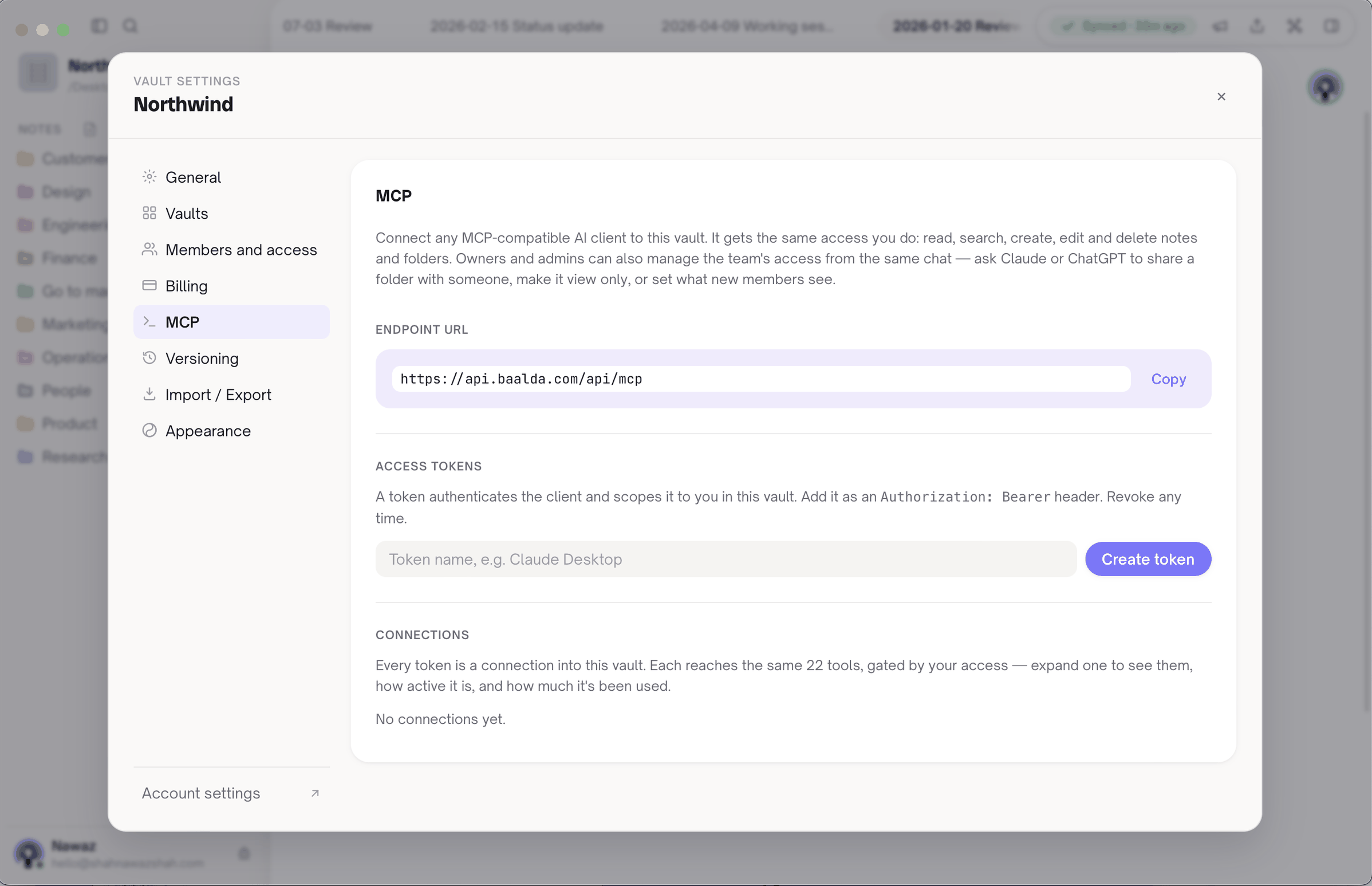
2. Register the server once, for every repository. Copilot CLI's documented command takes a header:
copilot mcp add --transport http \
  --header "Authorization: Bearer mcp_your_token" \
  baalda https://api.baalda.com/api/mcp
That writes the server into ~/.copilot/mcp-config.json, the user-level file, so it applies everywhere rather than in one repo. On a self-hosted server, use your own URL plus /api/mcp. Writing an entry of this shape into that file by hand does the same:
{
  "mcpServers": {
    "baalda": {
      "type": "http",
      "url": "https://api.baalda.com/api/mcp",
      "headers": {
        "Authorization": "Bearer mcp_your_token"
      }
    }
  }
}
3. Let VS Code pick it up. VS Code's MCP reference lists ~/.copilot/mcp-config.json as a location it discovers, with Copilot CLI discovery on by default. If you would rather configure VS Code on its own, it uses a different shape, a top-level servers key in mcp.json. One caveat from VS Code's docs: servers that ask for a value through ${input:...} "aren't forwarded to Copilot harness sessions", so a token typed into a prompt reaches the local agent only.
4. Do not commit a token. Copilot CLI also reads a project .mcp.json. If you share one, keep the token out of it, because the token is that person's access. Each teammate mints their own. Baalda's MCP setup guide has the endpoint details.
5. Tell Copilot when to use it. A connected server is a set of tools, not a habit. One line in .github/copilot-instructions.md does it: search the team vault before a design change, and append the decision to the decisions folder after one.
Where does Baalda not help?
- It does not check notes against code. Copilot Memory's citation check is better than anything a notes app does for facts about the code. A vault note can go stale, and only people catch it. Keep code facts in the code, in instructions files, and in Copilot Memory.
- It is not automatic. Copilot Memory learns without being asked. A vault fills only when someone, or Copilot on someone's instruction, writes to it.
- Cloud agent and code review are not covered here. Those run on GitHub, and Copilot code review uses repository facts only.
- It is one more system. For a single developer on one repository, Copilot Memory plus a good instructions file may be all you need. The vault earns its place when knowledge has to outlive a repository, a person or 28 quiet days.