
Short answer
A local LLM second brain is a model you run yourself, through Ollama or LM Studio, reading and writing notes kept as plain markdown files. The model only makes the thinking private. Keep the notes as files you own, on a server you run if a team shares them, and the whole setup stays yours.
A local LLM second brain is a model you run on your own machine, through Ollama or LM Studio, reading and writing notes you keep as plain markdown files. The model is the easy half. The notes are the half that decides whether the setup stays private, and whether anyone besides you can use it.
Almost every guide to this builds the same thing: install Ollama, open an Obsidian vault, add a plugin that chats with your notes. It works, and for one person it is a good setup. But it answers one question, where does the thinking happen, and stays quiet on the other, where the knowledge sits and who else can reach it. A model on your laptop does not make your notes private if they sync through somebody else's cloud, and it does not make them useful to your team if they never leave your laptop. This post covers both halves, and where Baalda, an open source app that keeps a team's notes as plain markdown files, fits the second.
What does a local LLM second brain actually need?
Three parts, and each one can be local or not on its own terms:
- A model runner. Ollama or LM Studio, holding open weights on your own hardware.
- An agent or chat app that can call tools. A model on its own only produces text. Something has to turn "add this to the decisions page" into a file write.
- The notes. A folder of files, or a database inside an app, plus whatever search index sits over them.
The guides spend nearly all their words on the first part. The third part is the one that outlives every model you will try, which is why it is worth choosing first. If the notes are plain .md files, any runner and any agent can work on them, and swapping Qwen for Gemma next month changes nothing about what your team knows.
Where do the notes go when the model is local?
Most setups on the first page of results put them in one of three places, and each one leaks in a different direction:
| Where the notes live | What stays private | What breaks |
|---|---|---|
| One person's vault on one laptop | Everything | Nobody else can read or write it, so it is a personal notebook, not a shared memory |
| A cloud notes app the local model reaches over its API | The prompts and the model | The knowledge itself sits on the vendor's servers, which was the part you meant to keep |
| An embedding index built by a plugin | The files, mostly | The index is a derived copy in a format only that plugin reads |
For a team the first row is the real problem. Five people each running a private local second brain means five separate memories, and the decision one of them recorded on Tuesday is invisible to the other four on Wednesday.
How do you share a local LLM second brain with a team?
Keep the model on each laptop and share the notes. That is the shape Baalda is built for: a vault is a folder of plain markdown files on your own disk, it syncs to teammates in real time over CRDTs, and it is open source under Apache-2.0, so the server that holds the shared copy can be one you run yourself. The self-hosting guide covers the Docker setup.
There are two ways a local model gets at that vault, and the first one needs no integration at all.
Route one: the agent edits the files on disk. Because every note is a real .md file, a local agent pointed at the vault folder reads and writes it directly. Baalda's file watcher picks up each change and syncs it to everyone else. As of 1 November 2026, Ollama's own docs show how to run Claude Code on a local model with one command:
ollama launch claudeor by hand, pointing Claude Code at Ollama's Anthropic-compatible API on your machine:
export ANTHROPIC_AUTH_TOKEN=ollama
export ANTHROPIC_API_KEY=""
export ANTHROPIC_BASE_URL=http://localhost:11434
claude --model qwen3.5
Ollama's integrations page also lists OpenCode, the open source coding agent, under the same ollama launch menu, if you would rather the agent were open too. Either way, open the agent in the vault folder and it works on the team's notes like any other folder. Claude Code as a second brain covers the file-first setup in more detail.
Route two: the agent connects over MCP. When the agent is not on a machine that holds the vault, or when you want the server to decide what it can reach, Baalda serves an MCP endpoint at your server URL plus /api/mcp. You create a token in Vault Settings, MCP, and the client sends it as a bearer header.
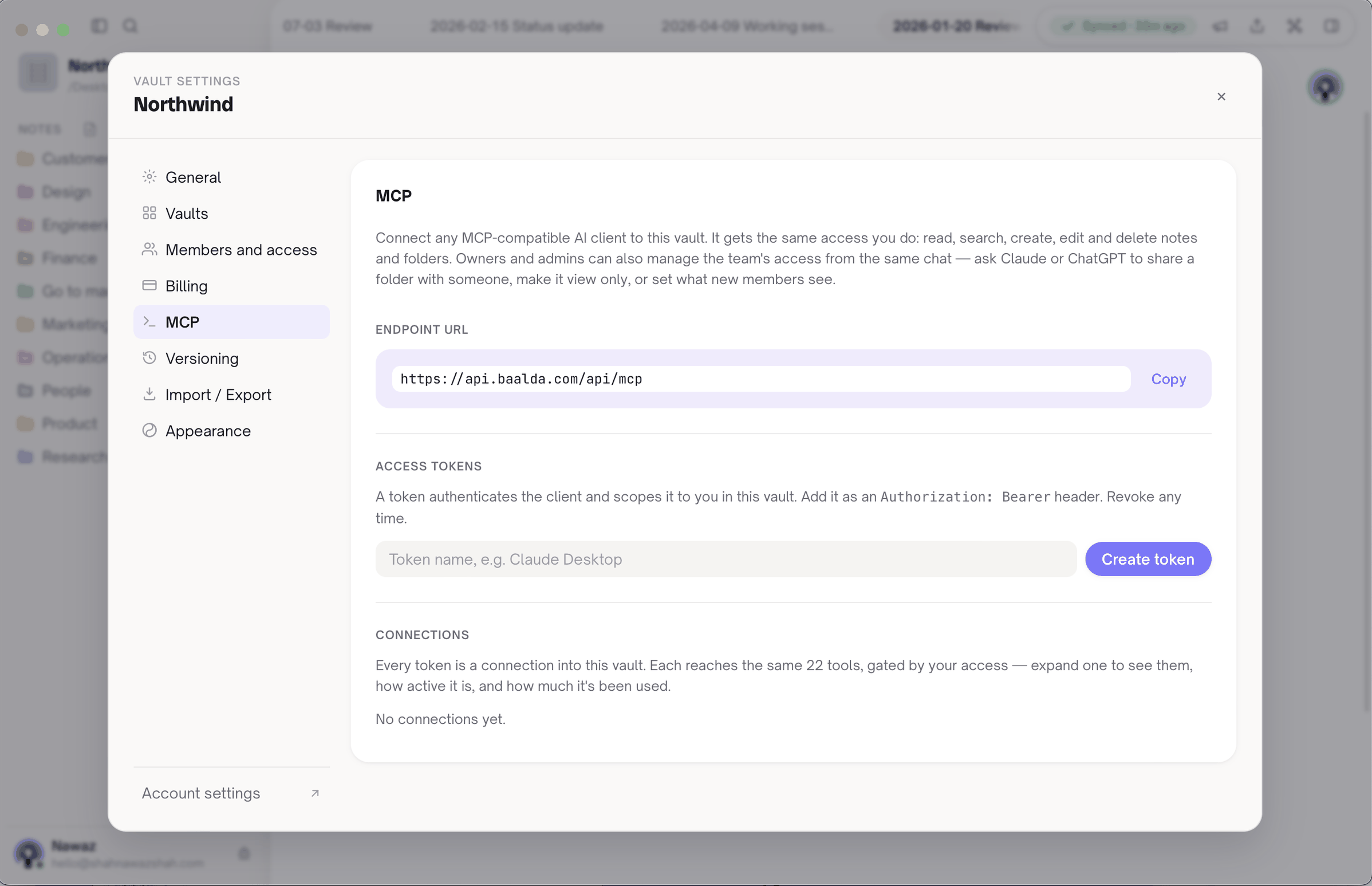
LM Studio has been an MCP host since version 0.3.17, and its config lives in ~/.lmstudio/mcp.json on macOS and Linux. Its docs show remote servers in this shape:
{
  "mcpServers": {
    "team-vault": {
      "url": "https://notes.your-company.internal/api/mcp",
      "headers": {
        "Authorization": "Bearer mcp_…"
      }
    }
  }
}
The model then gets tools such as search_notes, read_note, create_note and edit_note. A token is scoped to one person in one vault, so a folder that person cannot see does not show up in a listing or a search result and cannot be read or written. The model on the laptop gets exactly the access its owner has, no more.
Does anything leave the building?
Not the model and not the notes, if you self-host and run local weights. With Ollama or LM Studio the inference runs on your hardware. With a self-hosted Baalda server the shared copy of the notes sits on your own infrastructure, and the sync carries binary CRDT updates rather than the markdown files themselves. The server's built-in search uses a local embedder by default that makes no API call, so search keeps working on an air-gapped deploy. The agent app is a separate question: Claude Code is Anthropic's own closed CLI even when the model behind it is local, so check its network settings, or use OpenCode, if your reason for going local is that nothing may leave the machine.
There is a simpler version for one person: a new Baalda vault is local-only until you turn sharing on. It needs no account and never touches a server, so a local model plus a local-only vault is fully offline. It is also, by definition, not shared.
This is the same argument as owning both the model and the corpus when you self-host open weights. A private model reading a rented knowledge base has moved only half the stack.
Where does this setup fall short?
Baalda does not run a model, ship one or recommend one. It is the notes layer. The runner, the weights and the hardware are yours to choose.
Small local models are weaker at tool calling than the large hosted ones, and an agent is only as good as its tool calls. Ollama's Claude Code page says to set a context window of 64k or more for local models, and its Anthropic-compatible API does not support forcing a specific tool through tool_choice. Expect to try a few models before one handles multi-step edits reliably.
Baalda's default search is not semantic in the neural sense. The local embedder is a hashed bag of words: fast, private and deterministic, but it matches the words you wrote, not their meaning. A note about "customers leaving" will not surface for a search on "churn" unless the word is in it. The model can make up for some of that by trying several searches, but if neural semantic search over your notes is the main thing you want, a dedicated local RAG tool does that job better.
LM Studio's docs show the remote server shape but do not say which MCP transport a url entry uses. Baalda's endpoint speaks Streamable HTTP and does not open an SSE stream, so a client that only speaks the older SSE transport will not connect. This post has not tested every LM Studio build against it, so check yours before you roll it out to a team. Before handing any model write access, is MCP safe covers what a token can and cannot do.
Finally, if you use Baalda's managed Team plan instead of self-hosting, the shared copy lives on Baalda's server. The model can still be local, but the notes are then hosted by someone else, which may or may not meet the reason you went local in the first place.