
Short answer
For meeting notes in Obsidian, make a Meetings folder, save a template with the date, attendees, agenda, decisions and action items, and insert it with the core Templates plugin. That works for one note-taker. When several attendees need the same note, a shared folder with live editing keeps one copy instead of three.
Meeting notes in Obsidian come down to three things: a Meetings folder, a template with the date, attendees, agenda, decisions and action items, and the core Templates plugin to stamp it into a new note when the meeting starts. That is the whole setup, and for one person taking notes for themselves it is hard to beat.
The trouble starts when the notes are meant for the other people in the meeting. A meeting is the one kind of note that always has several authors and several readers, and Obsidian is built around one person's vault on one person's disk. This post sets up the template first, then covers the AI transcription plugins, then what changes when the whole room needs the same note. That last part is where Baalda comes in, because it keeps the same plain .md files but puts one shared Meetings folder under the whole team, with everyone typing into the same note and the assistant writing its summary into that note too.
How do you set up meeting notes in Obsidian?
Turn on the Templates core plugin, make a Templates folder, and point the plugin at it under Settings, Core plugins, Templates, Template folder location. Then save a note like this one as Templates/Meeting.md:
---
date: {{date}}
attendees:
project:
---
# {{title}}

### Agenda

### Notes

### Decisions

### Action items
- [ ] Owner · task · due date
The core plugin fills in three variables, as of 6 November 2026: {{title}} for the note's name, {{date}} for today (format YYYY-MM-DD by default) and {{time}} (default HH:mm). Both date variables take a Moment.js format after a colon, so {{date:dddd D MMMM}} works. Obsidian's Templates help page also warns that Live Preview's properties panel can overwrite unquoted variables, so edit the template itself in Source mode.
When a meeting starts, create a note in Meetings named for the date and the meeting, such as 2026-11-06 Standup, and insert the template. If you want the title and folder filled in for you, the Templater community plugin and the Meeting Tools plugin both do that. Meeting Tools writes the note into a folder you configure and, in its own words, makes no network requests.
Two habits make the folder worth keeping. Name every note with the date first, so the folder sorts itself. And put each decision on its own line under Decisions, so a search for a topic across Meetings turns up the answer rather than the conversation that led to it.
Which Obsidian plugins write AI meeting notes?
Several community plugins take a recording or a live meeting and turn it into a note. The listings, as of 6 November 2026, describe four of them this way:
| Plugin | What it does | Where the audio or transcript goes | Platforms |
|---|---|---|---|
| Meeting Notes | Transcribes existing recordings, summarises transcripts | OpenAI | Desktop and mobile |
| VoxNote | Transcribes recordings, optional template-based summary | Deepgram, then Gemini for the summary | Desktop and mobile |
| Shorthand | Live meeting notes with your existing AI subscription | Transcribed locally by the Shorthand desktop app, then sent to the AI you pick | Desktop only |
| Meeting Copilot | Calendar sync, recording, transcription, summaries | An OpenAI-compatible endpoint, or Whisper on the device | macOS 13.3 or later, Apple Silicon |
Most of them are young. Meeting Notes, Shorthand and Meeting Copilot each showed a few hundred downloads on their listing pages, and VoxNote about two thousand. Read the privacy section of whichever you choose, because the recording of a meeting leaves the device for the provider in most of these setups.
Every one of them writes into a folder in the vault of whoever ran it. That is fine when the vault is yours. It is the whole problem when the meeting was a team's.
What goes wrong when the whole team takes meeting notes in Obsidian?
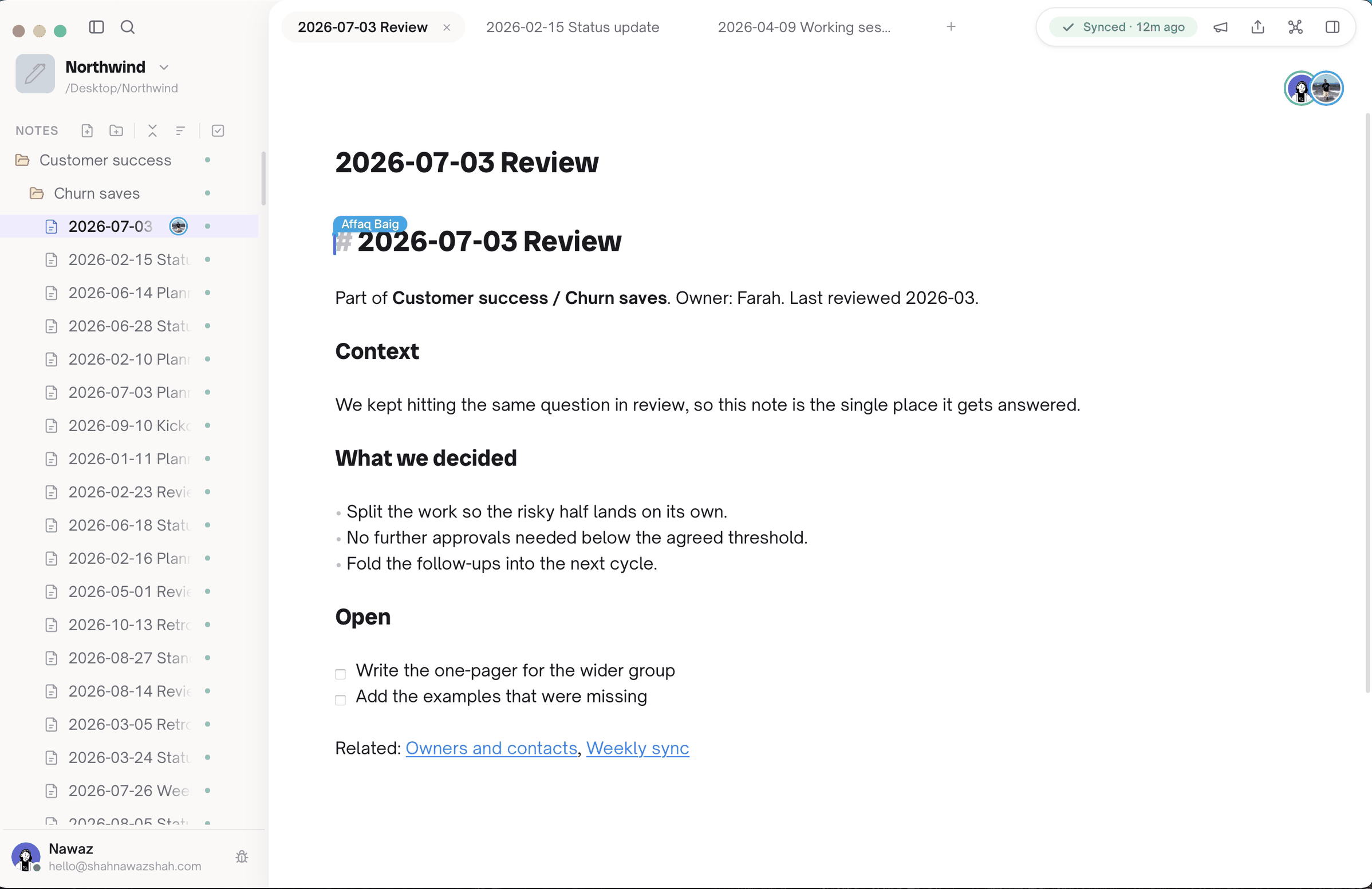
Three people leave the same standup with three different notes, or one person takes the notes and the other two never open them. The picture below is what that looks like next to the alternative.
The usual fix is a shared vault through Obsidian Sync. Obsidian's collaboration page sets out what that gives you, as of 6 November 2026:
- The whole vault, not a folder. You share a remote vault, and every collaborator gets the owner's permissions. Fine-grained permissions are "not supported yet".
- Up to 20 people, and every one of them needs their own Sync subscription. The costed version of that decision is its own post.
- No live editing. In Obsidian's words, "You will not see the other user's cursor, and their edits will only appear once the changes are synced." Edits to the same file are merged during syncing.
Meetings hit that last point harder than any other note, because a meeting is exactly when several people type into one file at the same moment. Obsidian merges conflicting markdown with Google's diff-match-patch, which keeps every edit but can, as its own troubleshooting page says, "create duplicate text or formatting problems". The same page names a case that reads like a standup: if you create a note locally and Sync downloads a remote version of the same note within a couple of minutes, Sync keeps the remote one without merging, and it calls this out as common with Daily notes and Templater. Two attendees stamping the template into 2026-11-06 Standup at 9:00 is that case. Your copy is recoverable through File recovery, but only if you notice. Why merging after the fact goes wrong is covered in Obsidian sync conflicts.
How does a shared meeting note work in Baalda?
Baalda is a local-first desktop app where every note is a plain .md file on your own disk, like an Obsidian vault, except the vault can be shared and edited together in real time. Your template and your Meetings folder carry over unchanged, because they are the same files.
The meeting itself changes in three ways:
- Share the folder, not the vault. Access is set per folder and per note, for the whole team or one person, and it is enforced by the server. Give the attendees Can edit on
Meetings, leaveMeetings/Leadershipat No access for everyone else, and a person who loses access has their local copy moved to their device's trash rather than left readable. - One person creates the note, everyone types into it. Edits from every attendee go through the same CRDT as operations, so they merge as they happen instead of after a sync. You see each person's cursor, in their own colour, and the avatars of who is in the note.
- The note is a file on every attendee's disk. When the meeting ends nobody has to send it round. It is already in everyone's
Meetingsfolder, and it works offline.
How do you get the AI summary into the same note?
This is the part the transcription plugins cannot do for a team. The summary should sit under the notes it was made from, in the file everyone already has, not in a VoxNote folder in one person's vault.
Baalda gives an assistant two ways in. A local agent such as Claude Code can edit the .md file on disk directly, and the change merges live with whatever the attendees are typing. A cloud assistant connects to the vault's built-in MCP endpoint, where it acts with the permissions of the person whose token it holds, so it reaches Meetings only if that person can. The MCP setup guide covers creating the token and connecting Claude Code, a custom connector or any other MCP client.
Over MCP, the assistant finds the note with search_notes or list_notes, reads it with read_note, and adds its section with append_note, which writes to the end of the note. Two arguments on that tool matter for meetings:
{
  "docId": "<the standup note's id>",
  "text": "## Summary and action items\n- Ana · ship the importer fix · Friday\n- Ben · draft the pricing note · Tuesday",
  "expectedRevision": "<revision from read_note>",
  "idempotencyKey": "standup-2026-11-06-summary"
}
expectedRevision makes the append refuse if someone has changed the note since the assistant read it, so a summary is never written against notes it did not see. idempotencyKey means that if the assistant retries the call, the summary is not appended twice. Paste in the transcript from whichever recorder you use, ask the assistant to summarise it into the standup note, and the decisions land in the one place the team already looks.
Where does Baalda not help?
- It does not record or transcribe meetings. You still need a recorder or one of the plugins above for the transcript. Baalda's push-to-talk broadcasts a voice to the vault and is never recorded or stored, so it is no substitute.
- It has no note templates feature. Keep
Templates/Meeting.mdas a note and copy it, or ask the assistant to create each meeting note from it withcreate_note. If one-click templates and Templater scripts are central to how you work, Obsidian is better at that today. - Two people can still create two notes. Agree that the chair, or the assistant before the meeting, creates the note, and everyone else opens it.
- Sharing beyond two people is not free on the managed service. The Free plan covers 2 people and 1 synced vault. A bigger team needs the Team plan at $10 per seat a month, minimum three seats, or a self-hosted server, which is free and unlimited.
- For a solo note-taker, Obsidian is the better app. Its plugin library is far larger, and if nobody else reads your meeting notes, none of the above matters. The Obsidian comparison lays out the rest of that trade.