
Short answer
The PARA method works for a team when Projects, Areas, Resources and Archives are shared folders and each folder decides who can edit it, who can only read it, and what an AI assistant reaches. Tiago Forte's team rule is to keep work personal by default and share a project once more than one person works on it.
The PARA method works for a team when the four folders are shared and each folder, not the whole drive, decides who can edit it, who can only read it, and what an AI assistant can reach. Tiago Forte's own rule for teams is to keep work personal by default and share a project only once it has more than one person on it.
That rule is easy to agree with and hard to run. On a shared drive, "personal" and "shared" are two different places, so every promotion is a move, every move changes who can see the thing, and nobody is quite sure what the archive is for. I build the team version in Baalda, where the four folders sit in one shared tree of plain markdown files and those transitions are access changes on a folder rather than trips between drives. Below is Forte's method as he wrote it, what breaks at ten people, and the setup that holds.
What is the PARA method, and what changes for a team?
PARA is Forte's way of organising everything you keep into four top-level folders. His main page on it was published on 24 February 2023 and updated on 15 April 2026, and the definitions there are short:
- Projects: "short-term efforts (in your work or personal life) that you take on with a certain goal in mind."
- Areas: "important parts of your work and life that require ongoing attention."
- Resources: topics "you're interested in and learning about".
- Archives: "anything from the previous three categories that is no longer active, but you might want to save for future reference".
For one person that is the whole system. Things move from left to right as they finish, and the only reader is you.
A team adds two things the personal version never had to answer. Several people file into the same folders, so they have to agree on what counts as a project. And not everyone should read everything, which means the folder tree is now also an access map, whether anyone planned it as one or not. If you are still deciding whether you want PARA at all, how to build a second brain covers the rest of Forte's method first.
What does Tiago Forte recommend for using PARA in a team?
Forte wrote it up in "Team Knowledge Management: How to Use PARA in Your Organization", published on 13 March 2023 and updated on 15 June 2025. It gives five recommendations:
- Get clear on your organization's flavor of PARA.
- Train people in how to use PARA.
- Keep only shared projects on shared platforms.
- Default to informality whenever possible.
- Encourage a culture of writing.
The third one carries the design. He advises keeping "all their notes, files, and documents in their own individual PARA folders by default", and says that "only when a project or area becomes collaborative, with multiple people involved, should it be moved to shared Projects or Areas folders." He suggests writing the decisions down in a one-page "PARA Guide", and naming a "PARA Champion" to oversee it.
The older team piece that still ranks for this query is a guest post by Nat Eliason on Forte's blog, published on 12 November 2018 and updated on 31 January 2020. His team ran projects in Asana and kept files in Google Drive, and his main lesson was that "the first step to getting PARA and BASB to work for a team is loosening the strictness."
On permissions, Forte's article says it in one sentence: "You absolutely do not want everyone to have access to everything." It does not say how. That gap is where most team PARA setups go wrong.
What breaks when ten people share one PARA?
Three moments, and each of them is a transition between folders.
Personal to shared. On a drive, Forte's rule means a project starts in someone's own folder and gets moved to the shared drive when a colleague joins. In Google Drive, Google's help page on moving into shared drives says ownership passes to the team once a file is in a shared drive, and warns that the move can change who has access, so promoting a project changes its owner and its audience in one step. That step is easy to skip, and the easy alternative is sharing straight out of a personal folder, which is how live work ends up outside the shared tree.
Active to archived. Archiving should mean "finished, kept for reference". On a shared drive anyone with edit access to Archives can keep editing in it, and anyone who can edit a project can drop it there. Nobody owns the move, so Archives fills up with things that are not finished and some that are not meant to be kept.
Human to assistant. This is the one Forte's 2023 article predates. When somebody connects Claude or another assistant to the team's notes, the assistant reads whatever its connector can see. If that connector has the drive, the "not everyone sees everything" rule now depends on the integration, not on the folders.
How do you set up PARA for a team in Baalda?
In Baalda the vault is a folder of plain .md files on each member's disk, edited together in real time, with access set per folder and per file. The four PARA folders are ordinary folders at the top:
Team vault/
  PARA guide.md
  1 Projects/
    Q4 pricing review/
    Onboarding rewrite/              (Private: Aisha only, for now)
  2 Areas/
    Hiring/                          (Private: founders and hiring lead)
    Support/
  3 Resources/
    Brand/
    SOPs/
  4 Archives/                        (Can view for members, Can edit for Mei)
Each of the three transitions then becomes a setting on a folder instead of a move between drives.
Personal by default, without a second drive. The person who created a folder can change who has access to it without being an admin. Aisha creates her project folder inside 1 Projects and sets it to Private. A Private folder is visible to its creator and to the people named on it, and nobody else, the vault's owners and admins included. When Tom joins the project she adds him to it, and when the whole team needs it she opens it. The folder never moves, so every link to a note inside it still works, and Forte's "only when it becomes collaborative" is a change on that one folder.
Archives that one person owns. Put 4 Archives in the Can view column for members and leave edit with whoever looks after it, which is Forte's PARA Champion by another name. Moving a folder in Baalda needs edit access on the folder and on the destination. The server's own comment on that check is that "re-parenting must not be a way to change inherited access", so a member cannot archive a project they cannot edit, or move it somewhere that would change who can read it. When the project does move, it keeps its id and its full edit history. Access set on the project folder itself goes with it, and anything it was inheriting now comes from Archives.
Sensitive Areas stay sensitive. 2 Areas/Hiring is Private with the founders and the hiring lead named on it. Folder settings apply to everything inside, so a new candidate note filed there is closed the moment it is saved, with nobody having to remember to restrict it.
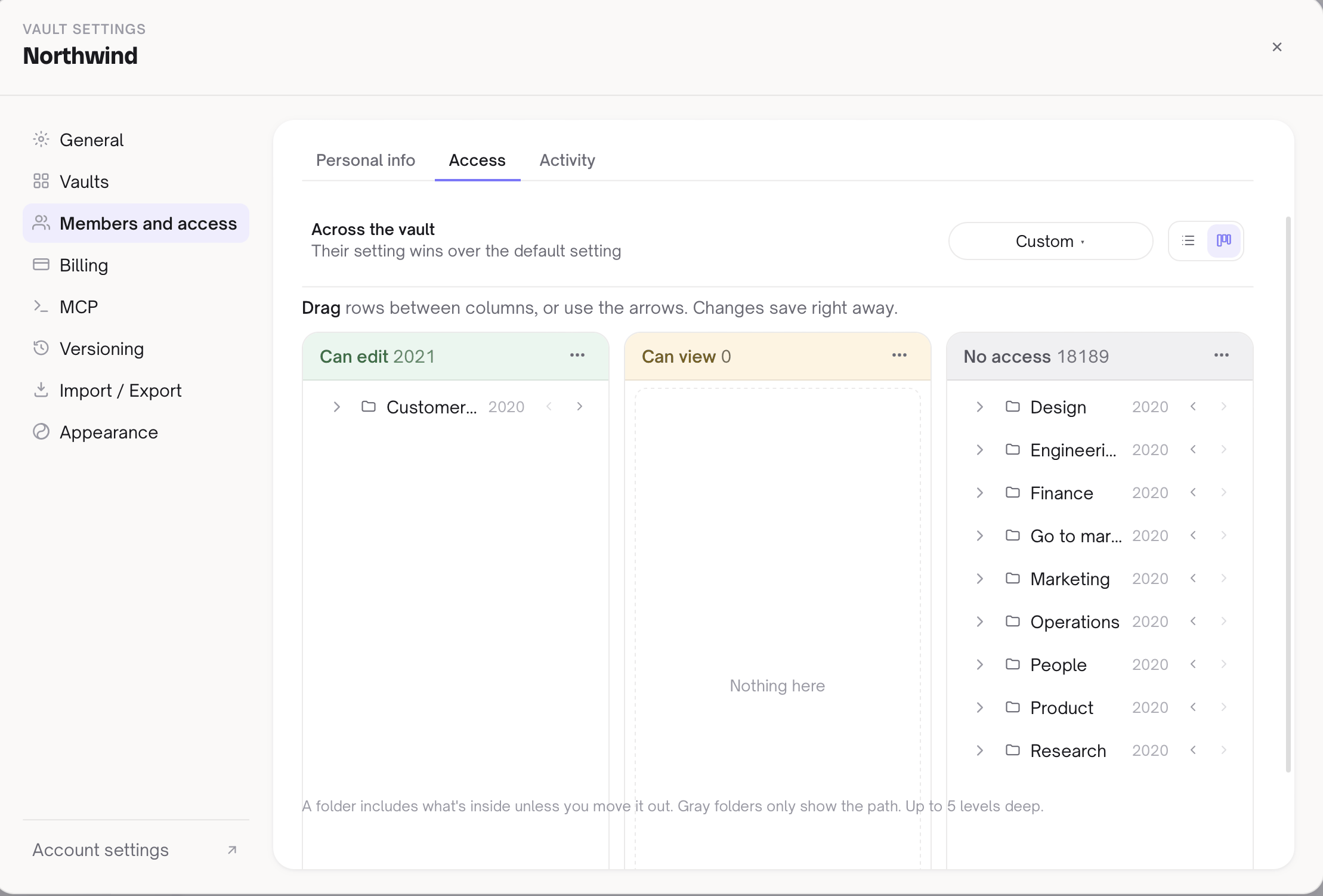
This is the Access board in vault settings, one member's view of the tree, with folders sorted into Can edit, Can view and No access:
If your team is on Obsidian today, Obsidian per-file permissions explains why a local editor reading a folder cannot do any of this on its own, and what the add-ons do instead.
Can Claude or another AI assistant use your PARA folders?
Yes, and this is where the per-folder setup earns its keep. Baalda's MCP server gives an assistant tools such as list_folders, read_note, search_notes, move_note and move_folder. Each person connects their assistant with their own token, and every call is checked against that person's access, through the same permission check the app uses.
So the PARA tree above looks different to each assistant. Aisha's Claude can read her Private project. Tom's cannot, until she adds him. list_folders returns the folders the caller can access, not the whole tree. And when someone asks their assistant to "archive everything in Projects that has not been touched since August", the archive rule still holds: the move is refused unless that person has edit access on 4 Archives.
That covers the para method claude question as well. The usual setup is one person's Claude reading one person's vault. In a team vault the assistant files into the same four folders as everyone else and inherits its owner's limits, which is what keeps it safe to let it file at all. AI to organize notes goes through the move tools and what to let an assistant do first.
What should the team's PARA guide say?
Forte's one-page guide is the cheapest part of this and the part most teams skip. Write it as a note at the top of the vault, PARA guide.md, so the assistants read the same rules as the people. Mine answers five things:
- What counts as a project here: one outcome and an end date, or it is an Area.
- Where new work starts: your own Private folder under
1 Projects, opened when someone else joins. - Who owns each Area, and who looks after
4 Archives. - What "done" means, and who moves a project to Archives.
- What does not go in the vault at all: credentials, personal data the team has no reason to hold.
Keep it to a page. An assistant that reads the guide before it files will follow the numbering and the naming, and a person who joins next month learns the system in two minutes. Second brain vs knowledge base is worth reading alongside it, because most teams discover their Resources folder is a knowledge base with a different name.
Where does Baalda not help?
Baalda supplies none of the method. It has no PARA template, it will not tell you whether something is a Project or an Area, and it has no opinion about how strict your team should be. Eliason's advice to loosen the strictness is about people, and no setting does it for you.
It is also not a task manager. Eliason's team ran projects in Asana and kept files in Drive, and Baalda only replaces the Drive half. If your projects live as tasks with due dates and assignees, you still need the tool that does that.
Inheritance cuts both ways. A folder with no access setting of its own takes its parent's, so moving it into a more open parent can widen who reads it. That is why the destination check exists, and why it is worth glancing at a folder's access after you reorganise.
And nothing is filed unless someone writes it. A shared PARA tree is only as current as the habit of putting work in it, which is Forte's fifth recommendation, and the only one software cannot carry.
PARA was built for one person sorting their own files. For a team, the four folders are the easy part. What makes it hold is that each folder decides who can see it, so moving work between them is a decision someone made rather than a side effect of where the file sits.