
Short answer
Devin Knowledge is org-wide tips Devin recalls by trigger. As of 21 November 2026 it is deprecated and migrating into Skills inside Devin-managed plugins, Playbooks are moving to Skills too, and Memory stays personal. Keep Devin-only procedures in Skills, and the knowledge several agents and people read in a team second brain, a markdown vault Devin reaches over MCP.
Devin Knowledge is the set of tips and instructions an organization saves for Devin, each one tagged with a trigger so Devin recalls it when its work matches. As of 21 November 2026 Cognition's docs mark it deprecated: "Existing Knowledge is being migrated to Skills in Plugins automatically." Playbooks are moving to Skills as well, and Memory is a separate, personal store.
So a team that has spent a year teaching Devin how it works is watching that knowledge move from one Devin-managed store into another. The migration is automatic, so nobody has to redo the work. The docs are also clear about where it ends up: migrated skills "live in Devin-managed plugins, not in your repositories", and "Nothing is committed to your repos." Whatever Devin knows about your team from Knowledge, Playbooks and Memory is readable by Devin. The Claude Code user down the hall, the Codex session in CI and the new hire looking for the deploy checklist all have to ask Devin, or go without.
That is the line this post draws. Devin's stores are good at telling Devin how to work. The team's actual knowledge, the decisions and context several tools and people read, belongs somewhere you own. It belongs in a team second brain. For us that is a Baalda vault: plain markdown files on your own disk that Devin, and every other agent your team runs, reads and writes over MCP with each person's own permissions.
What is Devin Knowledge, and what is replacing it?
Knowledge is, in the docs' words, "a collection of tips, advice, and instructions that Devin can reference in all sessions." You create it under Settings, then Resources, then Knowledge. Every item needs a trigger description, "a simple phrase or sentence", and Devin "will retrieve a Knowledge item when its current work is related to the specified triggers." Items can be pinned to one repository, to all repositories, or left to be recalled only when relevant.
Scope is organization by default, "visible to all members of the organization", with an Enterprise scope above it. Devin also suggests new Knowledge "based on your feedback in chat", which you edit before saving or dismiss.
The deprecation notice sits at the top of that same page: Knowledge "is deprecated and will be removed in a future update." New instructions should go into Skills. If you use the API, the old /v3/organizations/{org_id}/knowledge/notes endpoints give way to managed-plugin endpoints under /v3beta1, where migrated notes appear in a bundle called knowledge.
Devin Knowledge vs Playbooks vs Skills vs Memory: which is which?
Four names, and the docs are mid-move between them, which is most of the confusion. Here is the state as of 21 November 2026, from Cognition's own pages.
| Store | What it holds | Who sees it | Where it lives | Status |
|---|---|---|---|---|
| Knowledge | Short tips recalled by trigger | The organization or enterprise | Devin | Deprecated, migrating to Skills |
| Playbooks | A reusable prompt for a repeated task | Organization or enterprise | Devin | Moving to Skills; new accounts have none from 24 Oct 2026 |
| Skills | SKILL.md instructions Devin loads by name and description | Repo, personal, org or enterprise | Your repos, or Devin's Customize page | Current |
| Memory | What Devin learned working with you | You only | A Git "memory drive" of markdown, read-only in the app | Current, on by default |
The Playbooks page puts the boundary plainly: "A playbook is like a custom system prompt for a repeated task", while "Most best practices, style guides, or other project-specific instructions should be shared with Devin by using Skills." So for Devin users the answer to "knowledge vs playbook" is now "Skills, either way".
Skills are the one store that can sit in your repository. Devin recommends .agents/skills/<skill-name>/SKILL.md and also scans .claude/, .cursor/, .codex/ and similar folders, which is a genuinely good move. A repo skill is a file anyone can read. The migrated Knowledge is not one of those files, though. It lands in Devin's managed plugins.
Does Devin have memory?
Yes, separately from all of the above. The Memory page says it "lets Devin carry what it learns from working with you into future sessions", and that memories live in "a memory drive: a persistent Git repository of Markdown notes." About once a day a background session called Dreaming "Consolidates overlapping notes", removes stale ones and adds lessons.
Two lines on that page decide what Memory is for. It is "personal to you within each organization. It is not shared with your teammates or your organization." And "Memory files are read-only in the app": to fix one, you ask Devin in a session. Sessions started by automations "don't read or write your memory" at all.
That is a sensible design for preferences and habits. It is the same shape as Claude Code's auto memory, which we covered in does Claude Code have memory: useful to one person, invisible to the rest of the team.
Should team knowledge live in Devin or in a team second brain?
Split it by who has to read it.
- Repo rules go in AGENTS.md. Devin reads it "before it starts coding" and includes "up to 16 KiB" from the start of each file. Codex and Cursor read the same convention. Our guide to writing an AGENTS.md file covers what belongs in it.
- Devin-only procedures go in Devin Skills. If it only makes sense for Devin, keep it there, ideally as a repo skill so it is a file in version control.
- Everything several readers need goes in a shared second brain. Why the team picked Postgres over Dynamo, the customer's odd SSO setup, the incident write-up, the onboarding checklist. These have human readers and more than one agent reader, and none of them should depend on which agent vendor you pay this year.
Baalda is that third one, a second brain for the whole team. Notes are .md files on each member's disk, edited live by several people at once over a CRDT, with access set per folder and per note. The core is open source under Apache-2.0 and can be self-hosted. The same vault serves MCP at /api/mcp, so Devin reads it with tools like search_notes and read_note, and writes back with create_note, append_note and edit_note. A decision Devin writes down on Monday is a note the Claude Code user opens on Tuesday.
How do you connect Devin to a Baalda vault over MCP?
Devin manages MCP servers under Customize, then MCPs, at personal, organization or enterprise scope. It supports STDIO, SSE and HTTP, and the docs say "HTTP (Streamable HTTP) is recommended for new integrations." Baalda speaks Streamable HTTP only.
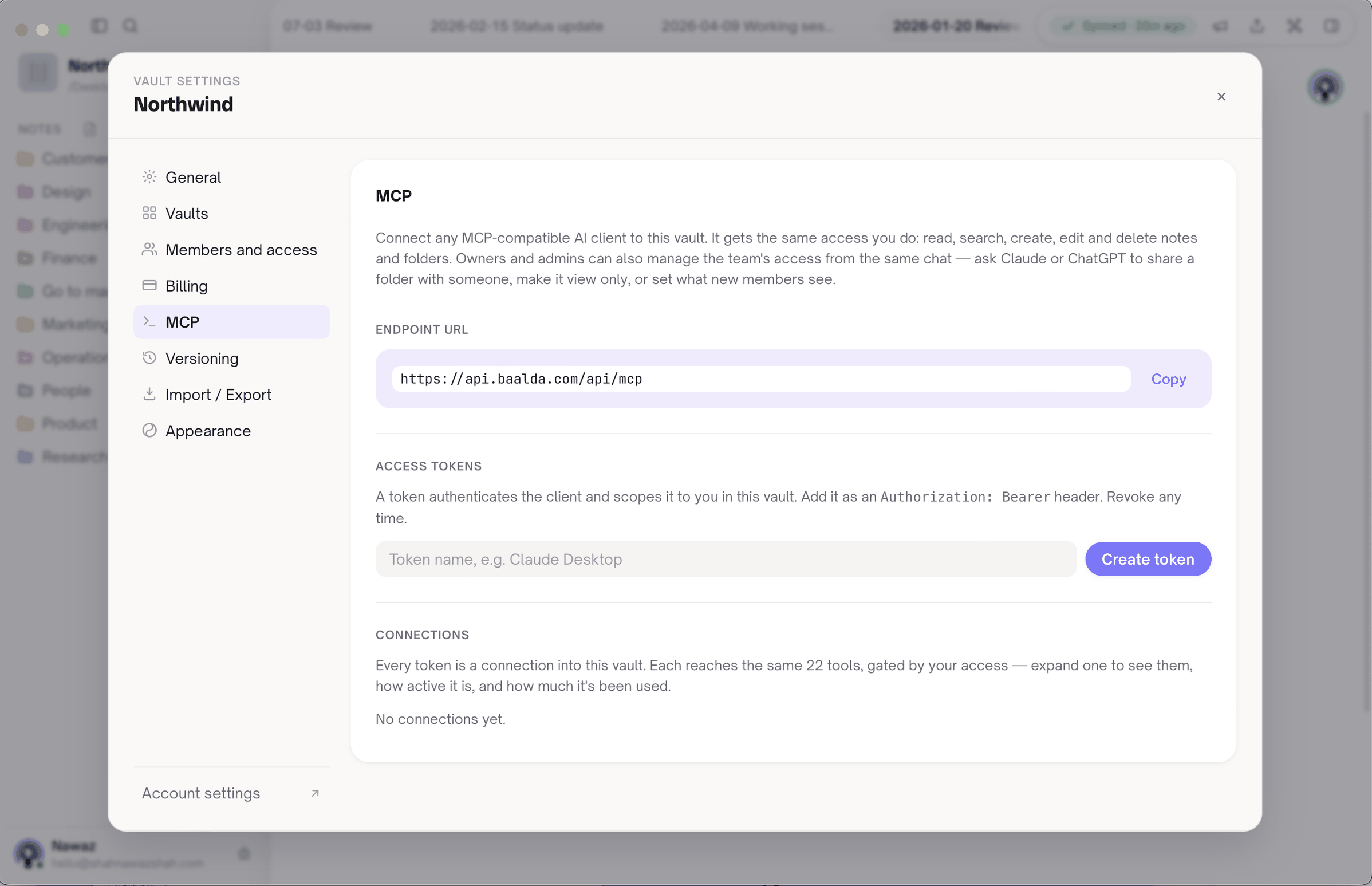
- In Baalda, open Vault settings, then MCP, and create a token. It starts with
mcp_, is shown once, and is scoped to you in that vault. - In Devin, open Customize, then MCPs, click the plus and choose New MCP. Leave the scope on yourself.
- Pick HTTP as the transport. Server URL is
https://api.baalda.com/api/mcp, or your own host with the same path if you self-host. - Under Authentication choose Authorization header, and paste
Bearerfollowed by your token. - Click Test tools. You should see the vault's tools listed.
In Devin's documented JSON shape, that is:
{
  "transport": "HTTP",
  "url": "https://api.baalda.com/api/mcp",
  "auth_method": "auth_header",
  "headers": {
    "Authorization": "Bearer mcp_your_token_here"
  }
}
Should the vault be connected per person or for the whole organization?
Per person, and this is the setting that matters most. Devin's MCP page describes organization-scope OAuth as "all members share a single authenticated connection" and says "We strongly recommend connecting a service account." That is right for a ticketing system. For a knowledge vault it means every member's Devin reads exactly what that one account can read.
Baalda's permissions follow the token. Every call runs as the person who minted it, so a folder you cannot open is a folder your Devin cannot read, and a note shared with you as view-only cannot be edited by your Devin either. Add the vault at personal scope, one token per person, and the vault's per-folder access carries straight into Devin. The finance folder stays with finance, even when finance and engineering both use Devin.
If the team also publishes agent skills in Baalda, the vault exposes them over the same connection: list_skills returns the published skills and get_skill returns one SKILL.md and its files. That is how a skill your team keeps in one place reaches Devin's cloud machine alongside the Claude and Codex skill folders on everyone's laptop.
Where does a vault not help?
Some of what Devin's own stores do, a vault does not.
- No trigger recall. Knowledge items were pulled in automatically when Devin's work matched a trigger. A vault is read when Devin calls a tool. Put a line in
AGENTS.mdor a repo skill telling Devin to search the vault before it starts, or it may not. - Not a native Devin skill. A skill fetched with
get_skillarrives as text in the session. Devin does not install it into its Customize page, and the Baalda desktop app that writes skills into local folders does not run on Devin's cloud machine. - The vault has to be reachable. The cloud Devin this post is about runs on its own machine, so a vault that exists only on one laptop is out of reach. Devin Desktop, the editor that used to be Windsurf, is the other case, covered in Windsurf as Devin Desktop. It needs the managed server or a self-hosted one at a public address.
- OAuth is untested here. Devin also offers OAuth for custom servers, and Baalda's endpoint supports OAuth clients. We have not tested that pairing, so the header route above is the one we can vouch for.
- Nothing is written by itself. Devin's suggestions and Dreaming generate knowledge for you. A vault holds what somebody, person or agent, chose to write. That is the point, and it is also work.
If your whole team uses only Devin, Devin Skills in your repos may be all you need. The vault earns its place the day a second agent, or a person outside engineering, needs the same knowledge.