
Short answer
Use NotebookLM as the reader, not the store. It answers from sources with citations, but every source is a copy of a document kept elsewhere and saved notes stay inside one notebook. Keep the second brain as files your team owns, upload what you need to study, and write the conclusions back to those files.
NotebookLM works well as the reading half of a second brain and poorly as the place you keep one. It answers questions over the sources you hand it, with citations, and it is very good at that. But every source is a copy of a document that lives somewhere else, and the notes you save inside a notebook stay in that notebook. So keep the notes themselves in files you own, and let NotebookLM read them.
A naming note before anything else: Google renamed NotebookLM to Gemini Notebook on 16 July 2026. The announcement says it "remains a standalone product focused on being your premier research tool", and the old address still works. Most people still search for it as NotebookLM, so this post uses both names.
Baalda is built for the half NotebookLM does not do. It keeps a team's notes as plain markdown files on your own disk, lets several people edit the same note at once, and lets an AI assistant read and write those same files over the Model Context Protocol (MCP). That is the split this post argues for: one tool that reads, and one place that keeps.
Can you use NotebookLM as a second brain?
For reading, yes. A second brain has two jobs: holding what you know, and helping you think with it. NotebookLM is strong at the second job. You give it a set of sources, it answers only from them, and every answer points back to the passage it came from. As of the 16 July announcement Google says more than 30 million people and over 600,000 organizations use it, and the guides ranking for this query are mostly about that side: how to set up notebooks and a custom instruction so it answers only from your sources.
The first job is where it gets thin. NotebookLM does not hold your knowledge. It holds copies of documents you already keep somewhere else, plus whatever notes you save inside one notebook. Those two facts decide how far it can go as a second brain, and they matter most once more than one person relies on it.
What does NotebookLM actually keep?
Google's own help pages are precise about this, and worth quoting rather than paraphrasing.
Sources are copies. "A source is a copy or auto-synced version of the source document you import or upload to the app." The auto-synced part covers Google Drive and YouTube. Drive imports "are auto-updated and will sync every few minutes", a change Google announced on 26 May 2026 for Docs, Sheets and Slides. An uploaded PDF, a Markdown file, pasted text or a web page is a snapshot from the moment you added it. Edit the original and the notebook keeps the old version until you replace it.
Limits are per notebook. The help page states up to 50 sources for Free users, and up to 500,000 words or 200MB per uploaded source. A second brain that grows past that has to be split across notebooks, and each notebook only answers from its own sources.
Notes stay in the notebook. You can write a note or press "Save to note" on a chat answer. The note can be exported, but one at a time: "Export to Docs" opens it as a new Google Doc, and Google's page says edits in Docs do not sync back to the original note and sharing permissions do not carry over. Make a copy of a notebook and "Chat history & notes are not copied."
Put those together and the shape is clear. The knowledge NotebookLM reads has to already live somewhere else. The knowledge it produces, the summaries and saved answers that are the actual payoff, lands in the one place that is hardest to move it out of.
Why does that matter more for a team?
Because a team second brain is mostly the produced part. The useful thing is not the forty PDFs. It is the paragraph somebody wrote after reading them: what the team decided, what turned out to be wrong, what the new person should read first. In NotebookLM that paragraph is a note inside a notebook.
Sharing works, but at the level of the whole notebook. You add someone as a Viewer, who gets "read-only access to all the source documents and notes", or as an Editor, who can "view, add, or remove sources and notes" and share it further. There is no way to give someone one note and not the rest, and no way to let a colleague correct a single saved answer without also letting them remove the sources under it.
There is also the question of how notes get in. Google's help pages describe one way: a person inside the notebook writes a note, pastes text, or saves a chat answer. A coding agent, a ChatGPT project or a colleague's Claude finishing a piece of work has no documented path to drop its finding into the notebook's notes. For one person studying, that is fine. For a team trying to keep what it learns, it means the second brain only grows when somebody remembers to go and feed it.
For more on the general version of this problem, what a team second brain is covers why personal tools strain at the second person, and ChatGPT as a second brain makes the same point about account-scoped memory.
Where should the notes live instead?
In files the team owns, that any AI tool can read and write. That is what Baalda does, and the mechanism is the point, so here it is concretely.
A Baalda vault is a folder of .md files on each member's disk. The same note can be open on three laptops and edited by all three at once, merged live through CRDTs rather than producing conflicted copies. Access is set per folder and per file, so the research folder can be open to everyone while the customer notes stay with the two people who need them.
An assistant reaches the vault over MCP. The endpoint is POST /api/mcp on the Baalda server, which on the managed service is https://api.baalda.com/api/mcp and on a self-hosted install is your own server's URL plus /api/mcp. Behind it are tools such as search_notes and read_note for reading, and create_note, append_note and edit_note for writing. Every call is checked against the access of the person who connected it, so the assistant reaches exactly what that member can reach and nothing more. The MCP server for team notes post covers that permission model in full.
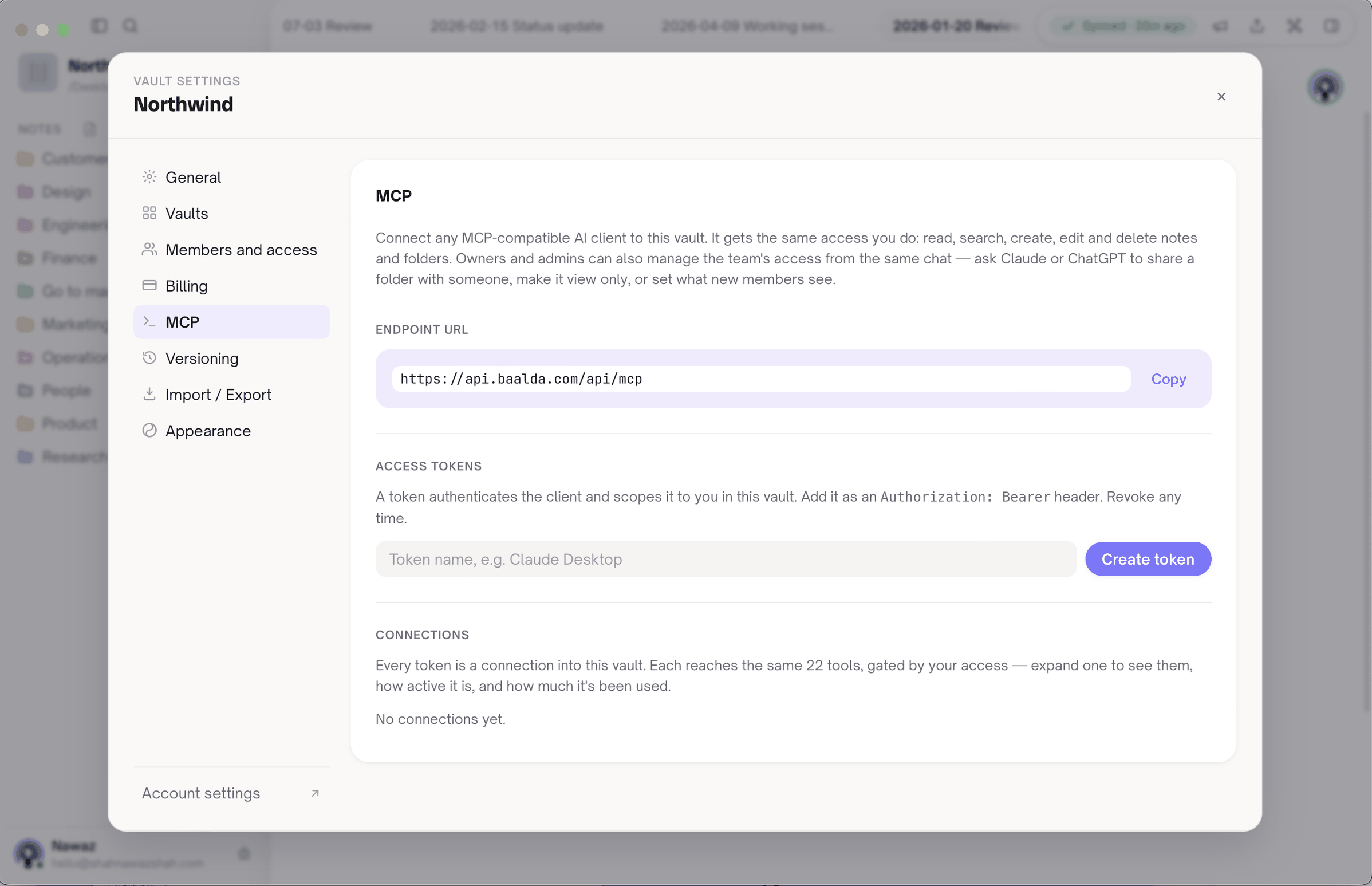
This is the part NotebookLM cannot do. When Claude or ChatGPT finishes a piece of research, it can call create_note and save the conclusion into the shared Research folder, as a plain file the rest of the team sees arrive in real time and can edit like any other note. read_note returns a revision number, and passing it back on a write means the write is refused if someone changed the note in the meantime, so an assistant cannot quietly overwrite a colleague's correction.
Baalda can also hold attachments, and an assistant can read their extracted text with read_attachment_text. That is useful, but it is not the same thing as NotebookLM's grounded answers, where each claim points back to the passage it came from. The next two sections are about that difference.
How do NotebookLM and a shared vault work together?
Use each for the job it is good at, and keep one direction of travel.
- The vault is the source of truth. Decisions, summaries, how-tos and anything the team relies on are markdown files there.
- When you need to study something hard, build a notebook. Upload the papers, the call recordings, the YouTube talks, and the handful of vault notes that give the context. NotebookLM supports Markdown and plain text as uploads.
- Think in NotebookLM. Ask questions, check the citations, generate the overview.
- Write the conclusion back into the vault, not into a notebook note. Paste it in, or ask an assistant connected over MCP to save it with
create_note.
Remember the uploaded vault notes are snapshots. If the notes change, re-upload them, because only Drive and YouTube sources sync.
This is close to what the better guides in this search already recommend with Obsidian: Obsidian holds the notes, NotebookLM reads them. That pairing is sensible for one person. The difference with a shared vault is that the place you write back to is the team's, with per-file access and an AI write path, rather than a folder on one laptop.
When is NotebookLM the better tool?
More often than a notes app would like to admit.
- Studying a stack of sources you did not write. Forty PDFs, a lecture series, a set of transcripts. Grounded answers with inline citations across all of them is NotebookLM's core, and Baalda has nothing equivalent.
- Audio and video sources. NotebookLM takes MP3, WAV and YouTube links directly. Baalda is a notes app, not a media reader.
- Generated study material. Audio Overviews, reports and data tables, and since July a secure cloud computer that can run code on your sources for Google AI Ultra and some Workspace customers. None of that is in Baalda.
- One person, one project, no handover. If nobody else will ever need the notes, keeping them in the notebook costs you very little.
And the honest limit on our side: there is no automatic sync from a Baalda vault into a NotebookLM notebook. Getting vault notes into a notebook means uploading them, and they go in as copies. If your team lives in Google Drive and wants every edit reflected in NotebookLM within minutes, Google Docs in Drive is the better source format for that specific need.
The rule that holds either way is simple. Let NotebookLM read as much as you like. Do not let it be the only place a conclusion is written down.