
Short answer
The best Obsidian Sync alternative depends on who is syncing. For one person on a Mac and iPhone, iCloud is free and officially supported. On Windows or Android, use Syncthing, or Self-hosted LiveSync for your own server. A team editing the same notes needs live editing and access per person, which is Relay inside Obsidian or Baalda outside it.
The best Obsidian Sync alternative depends on who is syncing. One person on a Mac and an iPhone should use iCloud, which Obsidian supports officially and which costs nothing extra. One person on Windows and Android should use Syncthing. A team editing the same notes needs something different from all of them, because no file sync tool knows there is more than one person. That is Relay if the team wants to stay inside Obsidian, or Baalda if it wants live editing, access per folder and a server it can run itself.
That last line is where most lists go wrong. They rank Syncthing beside Git beside Self-hosted LiveSync as if all of them answer the same question. They do, for one person and several devices. Add a second person and every one of them hands both people the same folder with the same rights, and leaves you to sort out the conflict copies.
What does Obsidian Sync actually give you for the money?
As of 11 November 2026, Obsidian's pricing page lists Sync at $4 per user per month billed annually, or $5 billed monthly. For that you get end-to-end encryption, sync on every platform Obsidian runs on, and version history: Obsidian's help page says notes are kept "for 1 month" on the Standard plan and "12 months" on Plus.
It also lets you share a vault, with limits Obsidian states plainly on its collaborate page:
- "All collaborators must have an active Sync subscription to access a shared vault."
- "All collaborators receive the same permissions as the vault owner", and "Fine-grained permissions are not supported yet."
- "Obsidian does not yet support collaborative live editing on the same file."
- The maximum is 20 people per shared vault.
So the question is really two questions. What replaces Sync for one person, and what replaces it for a team. The answers do not overlap.
Which Obsidian Sync alternatives work on iPhone and Android?
This is the column that decides most choices, and it is the one Obsidian's own sync help page is most direct about. As of 11 November 2026:
| Option | Cost | iPhone | Android | Live editing | Access per person |
|---|---|---|---|---|---|
| Obsidian Sync | $4 to $5 a user a month | Yes | Yes | No | No, owner rights for all |
| iCloud Drive | Your Apple storage | Yes | No | No | No |
| Syncthing | Free | No official app | Community fork | No | No |
| Git plugin | Free | "very unstable" | "very unstable" | No | Via the Git host |
| Self-hosted LiveSync | Free, plus a server | Yes, over HTTPS | Yes | Yes, for one person | No |
| Remotely Save | Free, some backends PRO | Yes | Yes | No, scheduled | No |
| Relay | Free to 3 users, then $5 to $18 | Yes | Yes | Yes | Folders, roles on paid plans |
| Baalda | Free to self-host | Not yet | Not yet | Yes | View, edit or hidden |
A few of these need their own sentence. Obsidian's help page says iCloud on Windows "may lead to file duplication or corruption", and lists Dropbox, Google Drive, OneDrive and Syncthing as unsupported on iOS. It also says "The official Syncthing Android app is no longer maintained" and points to the community Syncthing-Fork. The Obsidian Git README calls its own mobile support "very unstable" and says "I would not recommend using this plugin on mobile." Remotely Save syncs on a schedule and its README notes that auto sync "only works when Obsidian is being opened". On licences: Syncthing is MPL-2.0, LiveSync and the Git plugin are MIT, Remotely Save calls itself source-available, Obsidian Sync is closed, and Baalda is Apache-2.0.
Which one should one person use?
For one person, the honest ranking is short:
- Mac and iPhone only: iCloud. Free, supported, and the setup is keeping the vault in iCloud Drive. Mark the folder "Keep Downloaded" so iOS does not offload notes.
- Windows, Linux or Android: Syncthing. Device to device, no server, no account. On iPhone there is no official client, only third-party apps, which is where most people give up on it.
- You want your own server, on every platform: Self-hosted LiveSync. It syncs through CouchDB or object storage, works on mobile, and is the strongest free option. Its README asks you to back up your vault first and not to run it "alongside another synchronisation solution (including iCloud and Obsidian Sync)".
- You already use S3, Dropbox or WebDAV: Remotely Save. Simple, but scheduled rather than live, and conflict handling beyond the basics is a PRO feature.
- You want history more than sync: Git. Excellent on desktop, and a poor fit for a phone by its own author's account.
If none of that sounds worth the time, Obsidian Sync at $4 a month is a fair price for not thinking about it. It is the only option here that works the same on every platform with no setup. We covered the self-hosting side in more depth in self-hosting Obsidian notes is three different jobs.
What breaks when a second person joins the vault?
Every tool in the one-person list moves files. None of them has a user in it. Syncthing authenticates devices, not people. LiveSync syncs one vault to one database. iCloud shares a folder with whoever you invite, with the same rights you have.
Two things follow, and both show up in the first week:
- Two people edit one note, and you get a conflict copy. File sync sees two versions of the same file and keeps both, or keeps the last one. We went through why merging after the fact is too late in why Obsidian sync conflicts happen.
- Everyone sees everything. There is nowhere to say the hiring folder is for two people, or that a contractor can read the handbook but not edit it. Obsidian Sync does not have that either, by its own help page.
This is the point where "Obsidian Sync alternative" stops meaning a cheaper way to move files and starts meaning a way for several people to work in the same notes.
How does Baalda handle the team case?
Baalda keeps your notes as plain .md files in a folder on each person's disk, the same as an Obsidian vault, and syncs them with a CRDT instead of copying files. When anyone changes a file, a watcher turns the change into small operations, and those merge with what everyone else typed. Two people in one note see each other's cursors, and nobody gets a conflict copy, because no file is ever overwritten whole.
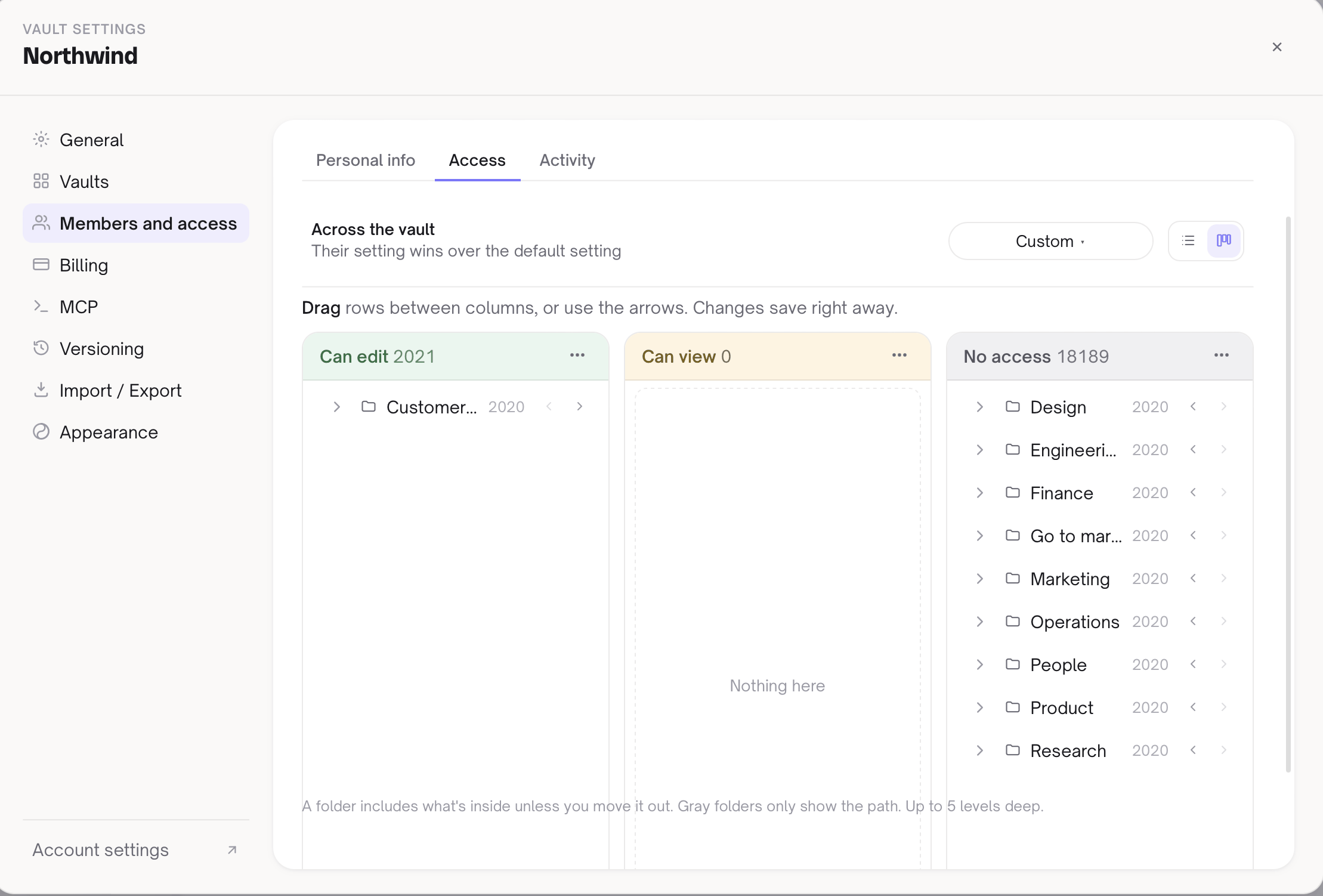
Access is set on folders and single files. Each one can be editable, view-only, or hidden from a given person, so the hiring folder stays with the people hiring and a contractor reads the handbook without changing it. The same rules apply when someone's assistant connects over MCP, so an AI tool cannot reach a folder its owner cannot.
On cost: the app is open source under Apache-2.0 and free to self-host with no seat limit. The managed backend is free for 2 people and 1 synced vault, and Team is $10 per seat a month or $110 per seat a year, minimum 3 seats. Because the notes are markdown files, an existing Obsidian vault opens as a folder, and you can leave the same way. There is more on that in how to share an Obsidian vault with others and the Baalda vs Obsidian comparison.
Where is Baalda the wrong answer?
- You need your notes on your phone. Baalda runs on macOS, Windows and Linux, and the iOS app is planned, not out. If mobile matters today, use Obsidian Sync, iCloud or LiveSync.
- You want to stay inside Obsidian with your plugins. Baalda is its own app. Relay adds live editing and folder sharing to Obsidian itself, and it is the closer fit if the team is attached to Obsidian's plugin setup.
- You are one person. Everything Baalda adds is for the second person onward. For one person, the list above is the better choice and most of it is free.
So which Obsidian Sync alternative should you pick?
Count the people first, then the devices. One person: iCloud on Apple, Syncthing elsewhere, LiveSync if you want your own server. A team that wants to stay in Obsidian: Relay. A team that wants live editing, access per folder, an AI that reads and writes the same notes, and a server it can run itself: Baalda.