
Short answer
A good second brain template is a folder of plain markdown files: Inbox, Projects, Areas, Resources and Archives folders, a home note with the filing rules, and four note templates for projects, meetings, sources and decisions. It is free, opens in Obsidian or any editor, and an AI assistant can read it without an integration.
A good second brain template is a folder of plain markdown files: four folders for your work, a home note that explains the rules, and four note templates you copy whenever you start something new. It is free, it opens in Obsidian, Baalda or any text editor, and an AI assistant can read it without an integration.
Most of what ranks for this query is something else. Forte Labs, the company behind the Building a Second Brain method, sells an official Notion template, Zapier gives one away, and template stores list dozens more, for Notion, Craft, xTiles and Taskade. Each of those is a workspace you duplicate into one app. The one below is files, so it is yours the moment you copy it, and it works for a team as well as one person. I build Baalda, a team second brain that keeps notes as markdown on each member's disk, so the team half of this post shows it there. The template itself does not need Baalda at all.
What should a second brain template include?
Three things, and nothing that only makes sense inside one app:
- A small, fixed set of top-level folders. The template below uses Tiago Forte's PARA (Projects, Areas, Resources, Archives), because it sorts by what you are doing with a note rather than by topic, and topics never stop multiplying. If you want the method behind it first, how to build a second brain covers it.
- A home note. One page that says what goes where, so future you, a teammate or an assistant can file something without guessing.
- A handful of note templates. A project, a meeting, a source you read, a decision. Four is enough. Every template you add is one more thing to choose between when you are in a hurry.
What a template should not include is anything that stops working when it leaves the app it was built in: dashboards that only exist as a query, relations between tables, rollup sums. Those are where most Notion templates put their effort, and they are the parts that do not survive an export.
The second brain template: copy this folder
Make these folders in an empty directory. The numbers keep them in the same order in every app's sidebar.
Second brain/
  Home.md
  0 Inbox/
  1 Projects/
  2 Areas/
  3 Resources/
  4 Archives/
  _templates/
    Project.md
    Meeting.md
    Source.md
    Decision.md
0 Inbox is where anything lands when you do not have time to decide. Empty it once a week into the other four. _templates holds the note templates; the underscore keeps it at the top and out of the way.
Home.md is the rulebook. Keep it to a screen:
# Home

How this second brain works. Read this before filing anything.

### Where things go
- 0 Inbox: anything not yet sorted. Emptied every Friday.
- 1 Projects: work with an outcome and an end date. One folder per project.
- 2 Areas: ongoing responsibilities with no end date (hiring, finance, health).
- 3 Resources: things worth keeping that are not tied to current work.
- 4 Archives: finished projects and areas you no longer look after.

### Rules
- New notes start from a file in _templates.
- File names are plain words, no dates, unless the note is a meeting.
- A project moves to 4 Archives when it is done, folder and all.
- Link the project from every meeting and decision about it, with [[Project name]].
What do the note templates look like?
Each one is a short markdown file with a few properties at the top. The {{title}} and {{date}} placeholders are Obsidian's template variables, explained in the next section; in any other editor, fill them in by hand.
_templates/Project.md:
---
type: project
status: active
started: "{{date}}"
due:
---

# {{title}}

### Outcome
What is true when this is finished, in one sentence.

### Why now

### Notes and links

### Open questions_templates/Meeting.md:
---
type: meeting
date: "{{date}}"
project:
people: []
---

# {{title}}

### Decided

### Actions
- [ ] Who, what, by when

### Notes_templates/Source.md, for an article, book, video or paper:
---
type: source
author:
link:
read: "{{date}}"
---

# {{title}}

### In one line

### What I want to remember

### Where I would use it_templates/Decision.md:
---
type: decision
date: "{{date}}"
status: decided
project:
---

# {{title}}

### The decision

### Options we considered

### Why this one

### What would make us revisit it
The Decision template is the one people skip and later miss most. Meetings record what was said; a decision note records what was settled and why, in a place you can find six months later without rereading the meeting.
How do you use the template in Obsidian?
Open the Second brain folder as a vault, then turn on the Templates core plugin. Obsidian's help page for it gives the steps: under Settings, Core plugins, Templates, set Template folder location to _templates. Then, in a new note, run "Templates: Insert template" from the command palette and pick one.
The placeholders are filled as the template goes in. Obsidian's page lists three variables: {{title}} is the title of the active note, {{date}} is today's date in YYYY-MM-DD by default, and {{time}} is the current time in HH:mm. Both date and time accept a Moment.js format, for example {{date:YYYY-MM-DD}}.
That is the whole setup. There are richer plugins for templates, and you may want one later, but the core plugin keeps the files plain. A template full of plugin-only syntax is a template only that plugin can read. Building a second brain in Obsidian goes further on properties, links and what to avoid if anything other than Obsidian will ever read the vault.
Notion template or markdown template?
A Notion template is quicker to start with and harder to leave. Notion's own export page sets the terms: "Any non-database Notion page can be exported as a Markdown file", while "Full page databases will be exported as a CSV file, with Markdown files for each subpage." Most second brain templates for Notion are built from databases, so most of what you write in them comes out as rows in a spreadsheet.
| Notion template | Markdown folder template | |
|---|---|---|
| Cost | Free or paid, by template | Free |
| Where the notes live | Your Notion workspace | Files on your disk |
| Views and dashboards | Database views, filters, rollups | None built in, or plugins |
| What an export gives you | Pages as markdown, databases as CSV | Nothing to export, it is already files |
| AI access | Notion's own AI, or Notion's MCP | Any assistant that can read a folder |
If you live in Notion and like its database views, a Notion template is the right call, and second brain in Notion explains how to build one that still exports cleanly. If you want the notes to be files you can move, a folder is the better template.
How do you turn it into a team second brain template?
The same folder works for a team with two changes: the home note grows a section on who owns what, and the folders get access of their own. A team is where a template stops being a matter of taste, because now the folder tree also decides who reads what.
In Baalda the vault is this folder. Each member has the .md files on their own disk, edits to the same note merge live, and access is set on folders and notes from Vault Settings, Members and access. The Everyone row sets the default (Can edit, Can view or No access) and any one person can be given their own level, folder by folder. A sensible start for the template:
0 Inbox,1 Projectsand3 Resources: Can edit for everyone.2 Areas/Hiringand anything like it: No access for everyone, Can edit for the two or three people who need it. A note filed inside inherits that, so nobody has to remember to restrict it.4 Archives: Can view for everyone, Can edit for the one person who looks after it._templatesandHome.md: Can view for most people, so the rules do not drift.
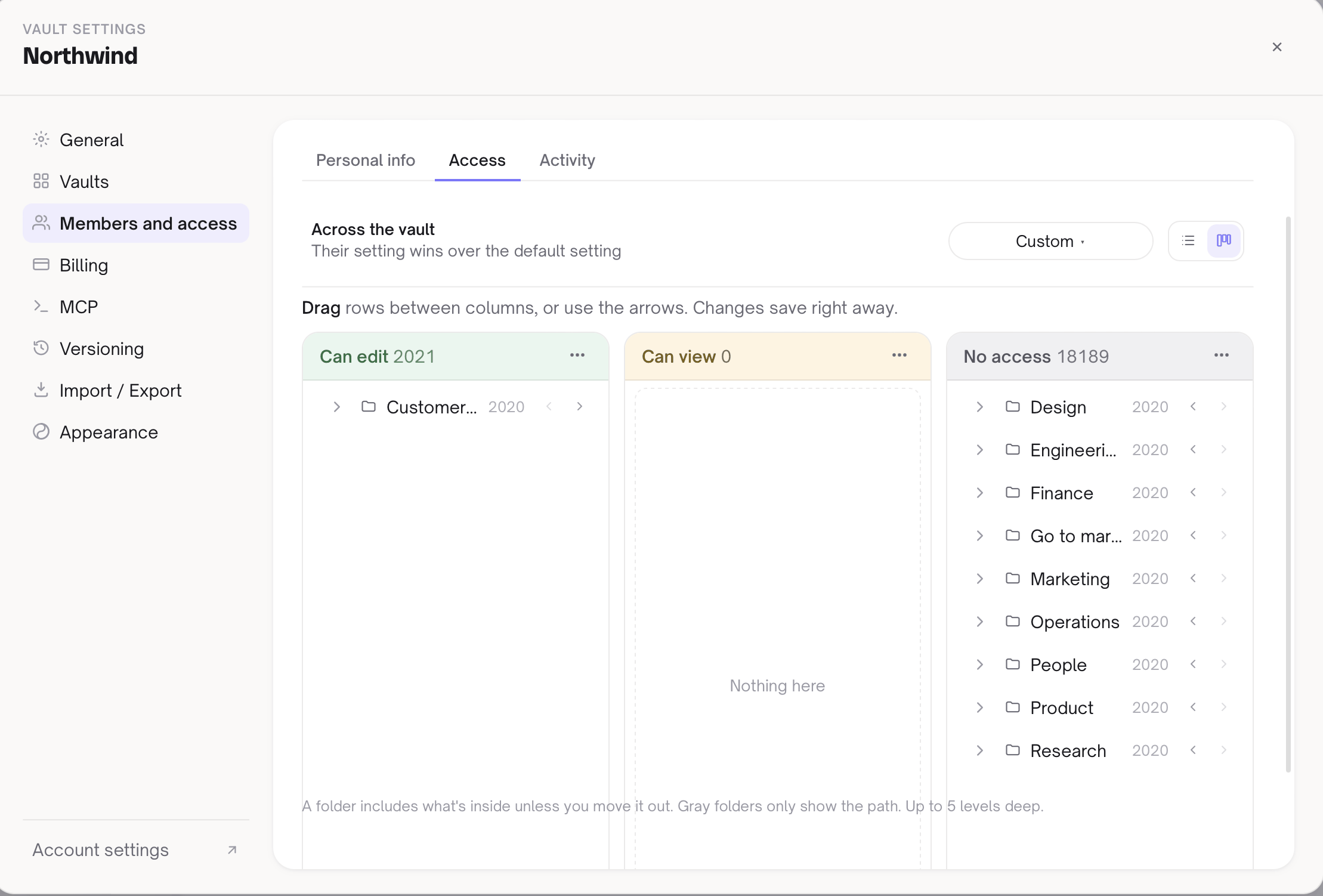
The part a Notion template cannot do the same way is the assistant. Each person connects Claude, ChatGPT or another MCP client to the vault with their own token, and it gets exactly that person's access. Ask it to "write up today's pricing call as a meeting note" and it can call read_note on _templates/Meeting.md, fill it in, and create_note in the right project folder, following Home.md like anyone else. Coding agents on the same machine, such as Claude Code or Codex, need no connection at all: they read and write the files directly and Baalda syncs the change. PARA method for teams covers the access side in more depth, including who should be allowed to move work into Archives.
Where does this template not help?
Baalda has no built-in template insertion. It does not read _templates and it does not replace {{date}}. On a Baalda team you copy a template file by hand, or ask the assistant to, which is what the MCP example above does. If one-click templates matter to you, Obsidian's core plugin does it today.
A folder has no database views. If your second brain is mostly a task list you sort by status and due date, a Notion template or a task manager is better at that, and this template does not pretend otherwise.
Baalda has no mobile app yet, so a team that captures mostly on phones will find the inbox emptier than planned.
And no template files anything by itself. The structure above is the easy part. Whether the second brain is useful in three months depends on the weekly habit of emptying the inbox and archiving what is done, which is true of every template in every app.
Copy the folder, use it for a week, and change Home.md the first time a rule gets in your way. A template you have edited is one you will keep using.