
Short answer
The MCP filesystem server, version 2.4.0, gives Claude and other MCP clients tools to read, search, write and move files in directories named at startup. It suits one person on one machine, but it cannot tell two people apart and its writes do not check what changed, so a team second brain needs a server that knows who is asking.
The MCP filesystem server is the Model Context Protocol project's reference server for giving an assistant your files: you name some directories when it starts, and Claude, or any MCP client, can read, search, write, edit and move files inside them and nowhere else. For one person on one machine it is the simplest way there is to connect an AI to a folder.
What it cannot do is tell people apart. Its boundary is a list of directories fixed when the process starts, and every client that reaches the process gets that same list. That is fine for your own notes and wrong for a folder five people write to, which is where a team second brain lives. This post covers what the server does as of version 2.4.0, how to set it up, why it fails to start, and what changes when the folder belongs to a team. That last part is the problem Baalda, an open source app that keeps a team's notes as plain markdown files, is built around, so it gets named where it applies and not before.
What is the MCP filesystem server?
It is @modelcontextprotocol/server-filesystem, published on npm from the modelcontextprotocol/servers repository under the MIT licence. As of 26 November 2026 the current version is 2.4.0, published on 18 November 2026, and it needs Node.js 24 or later when run through npx.
The server exposes tools in two groups. The read tools are read_text_file, read_media_file, read_multiple_files, list_directory, list_directory_with_sizes, directory_tree, search_files, get_file_info and list_allowed_directories. The write tools are write_file, append_file, edit_file, create_directory, move_file and copy_file. Every file inside the allowed directories is also readable as a resource at a file:// URI, though resources/list returns nothing, because the server never enumerates the disk.
Two details catch people out. search_files matches names with a glob and, in the README's words, "never reads or searches inside files", so it is not a full-text search. And write_file overwrites in place: the README says the overwrite "is not crash-atomic", so a crash mid-write can leave a file partly written.
How do you set up the filesystem server in Claude Desktop and Claude Code?
In Claude Desktop it is an entry in claude_desktop_config.json, listing every directory the assistant may touch after the package name:
{
  "mcpServers": {
    "filesystem": {
      "command": "npx",
      "args": [
        "-y",
        "@modelcontextprotocol/server-filesystem",
        "/Users/you/Notes",
        "/Users/you/Projects/site"
      ]
    }
  }
}
If you cannot find that file, where the Claude Desktop config file lives has the path for each operating system. On Windows the README launches npx through cmd, so command becomes "cmd" and the arguments start with "/c", "npx".
In Claude Code it is one command. Everything after -- is passed to the server untouched, which matters here because the directories and flags belong to the server, not to Claude:
claude mcp add --transport stdio filesystem -- \
  npx -y @modelcontextprotocol/server-filesystem ~/Notes
That uses Claude Code's default local scope, stored in ~/.claude.json for the current project only. Add --scope user to have it in every project. There is also a Docker image, mcp/filesystem, which expects each directory mounted under /projects and treats a mount with the ro flag as read-only.
How do you make the filesystem server read-only?
Version 2.4.0 has two flags for this, and both are enforced by the server whatever the client is set to allow.
--read-onlyregisters only the tools annotatedreadOnlyHint: true. The write tools are never listed, and a call to one fails as an unknown tool.--read-only-dir <path>protects one directory while the others stay writable. The write tools stay listed but refuse any target inside it,move_fileis refused if either end is inside it, and the check runs on the resolved path, so a symlink cannot route a write into it.
npx -y @modelcontextprotocol/server-filesystem \
  --read-only-dir ~/Notes/reference ~/Notes/drafts
That reads as "reference material Claude may quote, drafts Claude may edit", and for one person it is a good arrangement. The README adds that for defence in depth you should make protected directories read-only at the operating system level as well.
Why does the filesystem server fail to start or show as disconnected?
Most of the time it is one of these, all stated in the README:
- No directories. Started with no directory arguments, a server talking to a client that does not support Roots logs the reason to stderr and exits with status 1. Your client shows that as a failed or disconnected server.
- Roots no longer fill the gap. Roots, the feature that let a client hand the server its working directories at runtime, is deprecated as of protocol version 2026-07-28 (SEP-2577), with earliest removal in the first revision on or after 28 July 2027. A client on the 2026-07-28 protocol is never asked for Roots, so the command-line directories are the whole allow-list, and a server started without any answers every tool call with an error.
- A read-only directory that does not exist. A path given to
--read-only-dirthat cannot be resolved stops the server from starting, rather than leaving a path it could not pin down writable. - Node is too old. The
npxroute needs Node.js 24 or later. Checknode -vin the same shell your client launches from. - Windows. Without the
cmd /cwrapper,npxmay not launch at all.
The server logs its effective allowed directories to stderr at startup and whenever they change, so your client's MCP log is the first place to look.
What happens when two people point it at the same folder?
This is where the reference server stops, and it is worth being precise about why.
It knows paths, not people. Run it over HTTP with --transport streamable-http and it serves one /mcp endpoint to any number of clients. It listens on 127.0.0.1:3001 by default, and the README warns that HOST=0.0.0.0 "exposes it to every machine that can reach this one". Every one of those clients gets the same allowed directories, because the directories belong to the process. There is no notion of which colleague is asking, so there is no way to say the hiring folder is for two of them.
Its writes do not know what anyone else did. write_file replaces a file by path. edit_file matches oldText against whatever is on disk at that moment. Nothing checks that the file is still the version the assistant read a minute ago, and nothing tells an editor that has the file open. If a colleague saved a paragraph in between, the assistant's write either overwrites it or applies against text the model never saw. On a synced folder, the sync tool then has to decide what happened, and Dropbox's answer is a "conflicted copy".
Neither is a bug. A reference server for one machine has no reason to carry identity or coordinate writers. A team's notes need both.
How does Baalda give an assistant a team's markdown files instead?
Baalda keeps a team's notes as plain .md files on each member's disk, edited live by several people at once, and serves the same notes over MCP. It is a team second brain, and the part that matters here is the write path.
An AI write goes where a human edit goes. When Claude calls edit_note, update_note or append_note, the server applies the change to the note's shared CRDT document, the same Yjs document every open editor is connected to. If someone has the note open, the change is broadcast to them as it happens, the way a teammate's typing is, and they watch it arrive. If nobody has it open, the server loads the stored document, applies the change and saves it, and the next person to open the note gets it. There is no second writer behind anyone's back.
A stale write is refused, not merged. read_note returns the note's text and a revision. Pass that revision back as expectedRevision and the write is refused with a conflict if the note changed in between, so the assistant reads again rather than editing text it never saw.
claude mcp add --transport http context https://api.baalda.com/api/mcp \
  --header "Authorization: Bearer mcp_…"
The token is a person. That command registers the vault's MCP endpoint (your own server URL plus /api/mcp if you self-host). The token is created by one member in Vault Settings, MCP, and acts as that member in that vault, so list_notes and search_notes only return what that person can open, and a write to a folder they can only view is refused. The MCP tool reference lists every tool and what refuses each one.
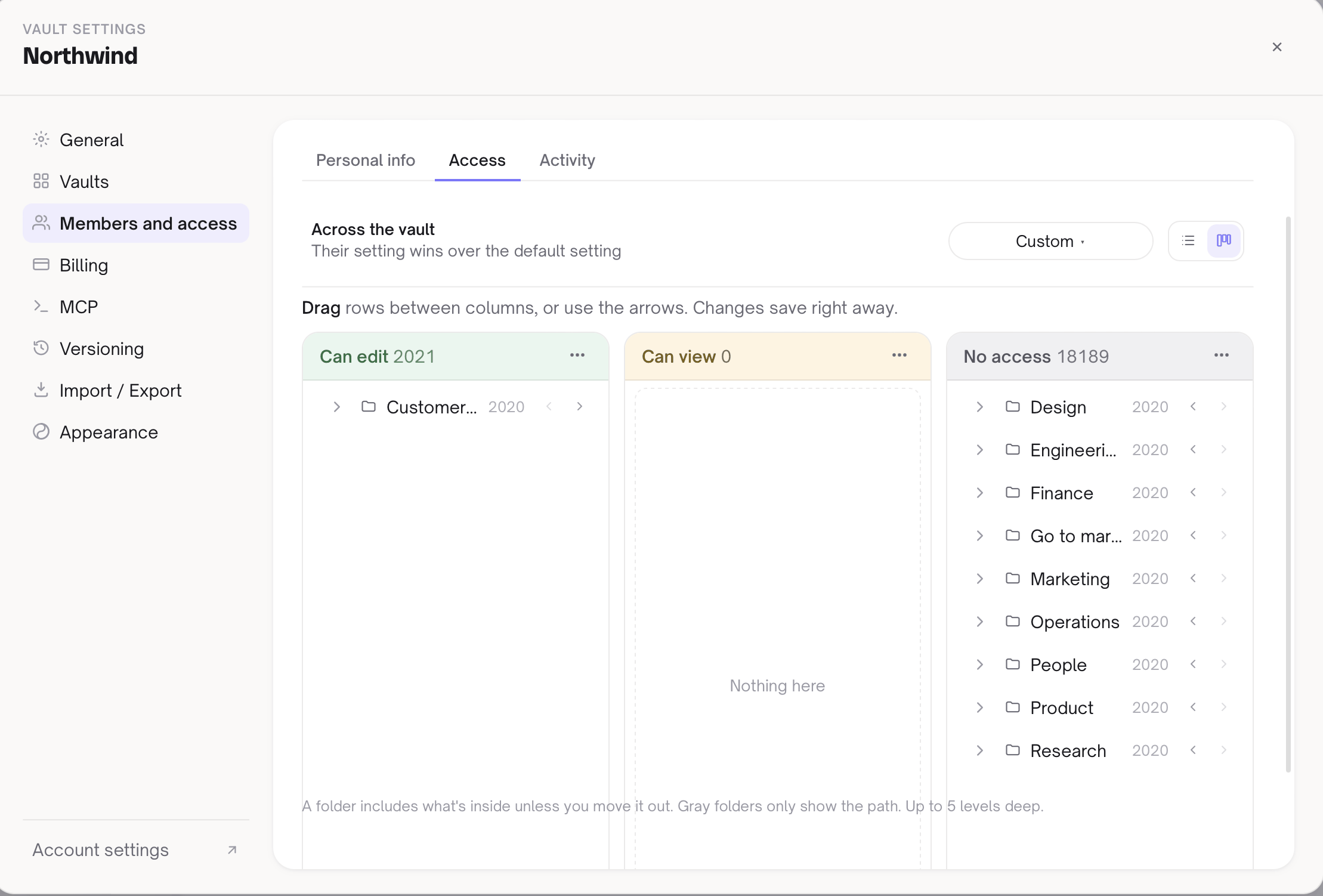
Where the filesystem server's boundary is a directory per process, this boundary is a person per call, and access control has the rules for how folder and note grants combine.
When is the filesystem server the better choice?
More often than a vendor would tell you.
- One person, one machine. If the notes are yours alone, the filesystem server is less to run than anything else here, and with
--read-only-dirit already draws a sensible line between what Claude reads and what it edits. - Code and arbitrary files. It reads any file, returns images and audio through
read_media_file, and hasdirectory_treeandcopy_file. Baalda's MCP tools work on notes and on the extracted text of attachments such as Word, Excel and PDF files, not on a repository or the binaries themselves. - A local agent on a Baalda vault. Because the vault is plain
.mdfiles on disk, Claude Code or Codex on your own machine can simply edit them, and Baalda's own README recommends that route. The app watches the folder and syncs the change to everyone. The boundary is then your own filesystem permissions, so point the agent at the vault, not your home folder.
Baalda's MCP endpoint earns its place when the folder has more than one writer, when some of it is not for everyone, or when the assistant runs somewhere your disk is not. It also needs a server, the managed one or your own, which the filesystem server does not.